windows内核驱动 4-内核注册表
使用内核注册表实现开机启动驱动等
内核注册表
驱动创建描述符SYM_NAME后,会出现在注册表计算机\HKEY_LOCAL_MACHINE\SYSTEM\ControlSet001\Services中
启动项的名字为驱动的文件名,例如hevd_2
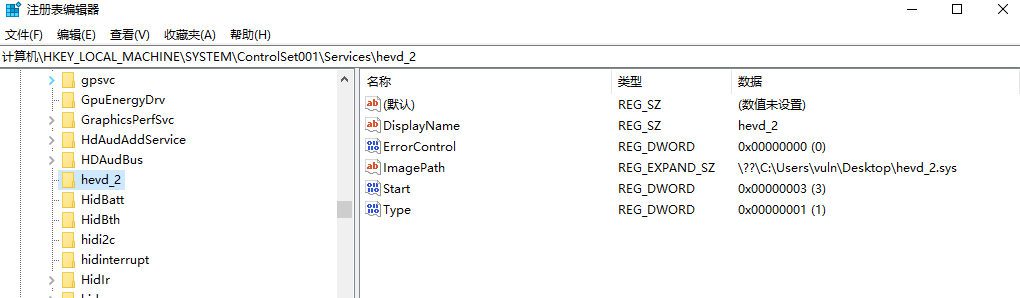
- Start:2-开机自启动、3-手动启动、4-禁用,数字越小启动越早
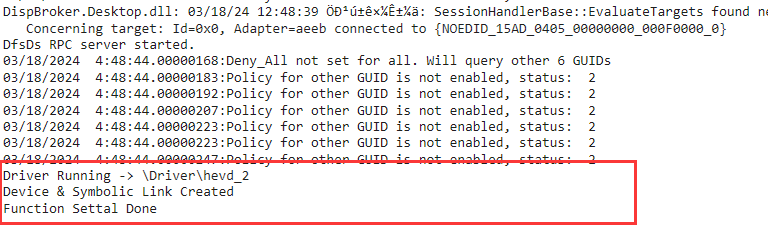
打开注册表ZwCreateKey和ZwOpenKey
移动驱动启动位置并修改注册表
ZwCreateKey
NTSTATUS status = STATUS_SUCCESS; |
ZwOpenKey
NTSTATUS KernelReg(PUNICODE_STRING RegistryPath) { |

再加上ZwSetValue和之前的文件复制,就能实现这个功能了,但是需要更多的技巧来提升启动时的运行位置更早。
也可以使用微软封装函数RtlWriteRegistryValue
All articles on this blog are licensed under CC BY-NC-SA 4.0 unless otherwise stated.
Related Articles
2024-03-27
windows内核驱动 8-计时器与通知
在内核中使用定时器、通知和回调 …学到一半打靶场去了 定时器 CPU最短能统计时间为100纳秒 100ns 内核中使用LARGEINT来表示时间长度 1s = -10 *1000 * 1000 基于设备的IO定时器 在DriverEntry里面尝试一下 VOID TimeWorker(PVOID CONTEXT) { DbgPrint("Irql: %d\n", KeGetCurrentIrql()); DbgPrint("Process: %s\n", PsGetProcessImageFileName(PsGetCurrentProcess()));}NTSTATUSDriverEntry(PDRIVER_OBJECT DriverObject, PUNICODE_STRING RegistryPath){// ... IoInitializeTimer(pDevice, TimeWorker, NULL); IoStartTimer(pDevice);}Un...

2024-01-25
【Win Pwn】HEVD-内核栈溢出(中)
在上一篇中了解了与内核的交互模式,这里就可以开始做HEVD了 文章已在先知社区投稿:https://xz.aliyun.com/t/13364 编写交互模块 A. 计算IO_CTL值 其实不用这步,但是可以当作更多的了解 在之前的交互中有这么一条定义功能号 #define IOCTL_MUL CTL_CODE(FILE_DEVICE_UNKNOWN, 0x9888, METHOD_BUFFERED, FILE_ANY_ACCESS) 但是…HEVD逆向会发现是这样的 发现CTL_CODE也是个宏定义 #define CTL_CODE( DeviceType, Function, Method, Access ) ( \ ((DeviceType) << 16) | ((Access) << 14) | ((Function) << 2) | (Method) \) 其中,这里 DeviceType -> FILE_DEVICE_UNKNOWN = 0x22 Function -> = ...
2026-05-01
【Win Pwn】Windows10 内核VS池溢出利用
Windows 10内核池溢出— VS类型 在HEVD练习上有这么一道题,是TriggerBufferOverflowNonPagedPoolNx __int64 __fastcall TriggerBufferOverflowNonPagedPoolNx(void *UserBuffer, size_t Size){ PVOID PoolWithTag; // rdi DbgPrintEx(0x4Du, 3u, "[+] Allocating Pool chunk\n"); PoolWithTag = ExAllocatePoolWithTag(NonPagedPoolNx, 0x1F0u, 'kcaH'); if ( PoolWithTag ) { DbgPrintEx(0x4Du, 3u, "[+] Pool Tag: %s\n", "'kcaH'"); DbgPrintEx(0x4Du, 3u, "[+] Pool Ty...
2023-05-24
【win内核原理与实现】I. Windows系统结构
Windows系统结构还有引导过程 I.a 大致结构 windows内核是从windows NT内核发展过来的,从开始就和硬件的发展息息相关。 Windows采用双模式(dual mode)结构来保护操作系统内核不受应用程序的错误而出现崩溃 windows的原始设计是一个支持多环境子系统的os,它还支持POSIX和OS/2环境子系统.为他们提供仿真执行环境 I.b windows内核组成结构 关于函数的开头 nt:内核提供的服务 Ldr:映像加载器函数 Csr:Windows子进程通讯函数 Dbg:调试函数 Etw:系统时间函数 Rtl:运行支持函数 执行体API函数接收的参数来自各种应用程序,通常会在程序的最开始处,对所接受的参数逐一探查他们的可访问性。 II. windows内核关键组件 HAL 硬件抽象层 HAL通常是一个独立的动态链接库,windows自身携带多种HAL,但是在系统安装的时候只会选择一种,改名为hal.dll。涉及中断控制器、单处理器/多处理器硬件断点。 内核(微内核) 在内核模块ntoskrnl.exe中的上层部分为执行体,下层最接近...
2024-03-19
windows内核驱动 5-中断级与自旋锁
顺便复习操作系统了 WinOS 相关原理 中断级 如果有时间的话可以试着玩一玩这个游戏:https://github.com/plbrault/youre-the-os 在线:https://plbrault.github.io/youre-the-os/ 或许在游玩的过程中你会自己总结出一套操作系统进程调度的一套方法,便于其他方法的理解 调度方式:抢占式 最小执行单元:纤程->线程->进程 中断级( Irql ) 0->2级别越来越高,高级别可以打断低级别 0:Pass level 1:Apc level 2: Dpc level ISR延迟调用,硬件中断后,不那么紧急的任务放在DPC队列中 DPC访问换页内存,页面换到磁盘中pagefile.sys,引起换页缺页中断,如果换页中断无法打断DPC,然后就会访问无效地址,造成BSOD,所以DPC中最好不要使用换页内存,也即要使用nonpagedpool,而不要使用paged pool hardware(io…) 强制打断:ipicall 自旋锁 有一间厕所,A进...
2025-04-16
【Win Pwn】Windows10 内核池溢出
内核也太难了,主要讲述大NonPagedPool的溢出利用 公众号:https://mp.weixin.qq.com/s/XjaPdNwqABFqDZsZTDtZJg 或许我们的公众号会有更多你感兴趣的内容 【复现】Windows10 内核池溢出 前置知识: windows内核调试 windows内核提权基础 简单的windows驱动编写(hello world级别) linux pwn堆溢出利用方式 一点点数据结构的知识(双向链表) 文章讲述并复现在Windows高版本内核中NonPagedPoolNx溢出的利用方法 目录 [toc] 利用方式 很多资料都是直接翻译外文文献,翻译质量差,没有直接的实操,并且随着windows的更新,比较缺乏现代windows 10\11的、比较易学的攻击方式。这里使用:Windows-Non-Paged-Pool-Overflow-Exploitation[1]作为基础的讲解,原文中的图示个人感觉还是讲的不够透彻,这里个人借着原文重新讲述下。 命名管道介绍 这是windows提供的用于进程间通讯的一种机制。首先是**服务...